Showing posts with label BI Basics. Show all posts

Wednesday, December 21, 2016

Data warehouse basics: What is Incremental Data Load ?

So we are back again to brush the basics. I have always felt that for a BI/DW developer to become successful he/she should have a very strong base about the basics. Here is one basic concept we hear often, Incremental load.

So what exactly is Incremental data load ?

Incremental data load is a type of data load scenario in a Data warehouse environment where the data that is updated/new are inserted to the target data warehouse with each scheduled run.

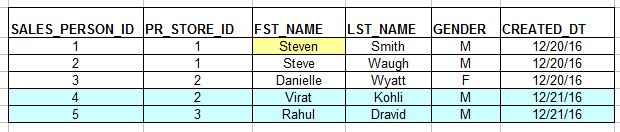
Imagine a sales person table as below which will be our source table in this case.


On the first day of loading to an EDW table, all the above three records would be moved.  The target table would be same as above. 

Now a day after they have added two new employees and also made a change to first name of a previous employee. Refer the screenshot below, 


Here with incremental update the two new records are considered and written to the target table. Also checks the source if the already existing records in EDW has any changes in source. There is the first record where FST_NAME was changed from Steve to Steven, hence this record is also considered and the change is updated in the target table. 

The advantages of incremental loads are the following,

  1. Reduces a major chunk I/O operations between source and target. 
  2. Faster than a full base load.


Wednesday, May 4, 2016

What is the OBIEE RPD File and it's Significance ?

The RPD file or Repository is the heart and soul of an OBIEE instance. We discussed earlier in one of our previous posts that Oracle BI has two kinds of metadata, one that exist in database tables and the other which exists in file format. The RPD file is the one of the OBIEE metadata that exists in physical file format, the other being the presentation catalog. 

What does the OBIEE RPD contain ?

The OBIEE RPD is where all the metadata related to a data warehouse or a data source is stored. It basically contains all the OLAP tables which are used to populate graphs and charts, the physical joins between the data. The star schema design/BMM design which tells the BI Server how OBIEE server should fire the query to the data warehouse/database.

The Repository is mainly composed of three layers:

1.Physical Layer 

 This is where you import all your Data warehouse tables. You create your database connection here along with the credentials to connect to the warehouse schema. You can also specify options like connection pooling, timeout option and various other database parameters.

Here you create Alias Tables for all the tables and define the joins between these tables. The joins defined here are inner joins. You can safely say that things relating to the database resides here. 

2.Business Model and Mapping(BMM) Layer

The BMM layer or Business Model and Mapping Layer is where you define the relation between the tables that you had earlier imported to your Physical Layer. Here you define your BMM diagram,  create hierarchies for your dimensions define complex joins between your database tables, set aggregation for measures.  You can also define complex calculations to facts here, however it is recommended to push all complex calculations to database or during the data load to the data warehouse.

Inside the RPD, arguably this is the most important layer as this is where each business process is defined in a way that OBIEE server understands. It is very crucial that the BMM model is designed properly for a compact BI Analytics implementation.

3. Presentation Layer

The presentation layer is what the end user or the BI Author user would see when they log in to the Analytics. The BI Author or the report developer pulls data from this layer using the web UI. It is important that the dimensions and facts are properly organised in this layer so that somebody developing the report would be able to easily pull in columns and build a report.

RPD Location - You can find the RPD file under the Middleware Home folder in your OBIEE server. The exact location to find the RPD file is as below,

MW_HOME/instance/instance1/bifoundation/OracleBIServerComponent/Repository/

In this folder you will be able to find the Repositories that have been deployed over time. To get the currently used RPD name go to Enterprise Manager > CoreApplication > Deployment Tab.

Which component of OBIEE manages the RPD file ?

It is the OracleBIServer component which comes under OracleBI11g components that handles and communicates to the repository file. Every time a request comes from the Web UI(Presentation layer). The OBIEE server refers to the metadata residing in Repository file to convert the same to a Physical SQL query. The data from the SQL query is sent back to analytics for use in reports.

Tuesday, October 6, 2015

DW Basics: What is a Data Mart ?

A Data Mart is a part of the Data Warehouse or a set of dimensions and fact tables that is concentrated on a particular area of a business.

Consider the example of an IT organization, the organization will be having many sub domains like HR, Finance, Sales, Recruitment etc.In a Data warehouse the data from all the subdomains will be available. A data mart is simply all the dimension or fact tables that are based on a single subject area, for example all the dimension and fact tables related to the Finance department would come under Finances data mart. 

Definition for a Data Mart is as follows,

Oracle - A data mart is a simple form of a data warehouse that is focused on a single subject (or functional area), such as Sales, Finance, or Marketing. Data marts are often built and controlled by a single department within an organization. 

Wikipedia The data mart is a subset of the data warehouse that is usually oriented to a specific business line or team. Data marts are small slices of the data warehouse.

DW Basics: What is a Data Warehouse ?

So what exactly is a Data Warehouse?. For any BI developer it is very essential to understand the concept of a Data Warehouse. 

Here are the definitions of a Data Warehouse, scrapped from across the internet.


Google - A large store of data accumulated from a wide range of sources within a company and used to guide management decisions.

Oracle - A data warehouse is a relational database that is designed for query and analysis rather than for transaction processing.

Wikipedia - A system used for reporting and data analysis. They store current and historical data and are used for creating analytical reports for knowledge workers throughout the enterprise.

Bill Inmon - A  Data warehouse is a subject-oriented, integrated, time-variant and non-volatile collection of data in support of management's decision making process.

Ralph KimballA copy of transaction data specifically structured for query and analysis.

In simple words Data Warehouse is nothing but a database with the following key points, 
  • Data analysis and historical data storage is the goal of a Data warehouse.
  • Data storage is not a concern and hence all levels of Normalization are not applied here.
  • Data from multiple sources are fetched and stored in an organized manner. 
  • Data is stored in a structured manner (eg: Star Schema) in order to optimize query and data retrieval process. 
  • Basically a high performance server with little constraints on storage and memory usage. 
  • Provides fast data throughput.