Showing posts with label Oracle 12c. Show all posts

Friday, March 1, 2019

Filter column with '&' value in Oracle SQL Developer

We had a data dump into oracle, where in a column value had an '&' in it. Say for example a company name like 'Johnson & Johnson'.


What happens now is SQL Developer expects a substitution variable when it encounters an ampersand.

If you have a table and need to filter on the same, you can go with the below script

SELECT * FROM ORGANIZATION WHERE ORG_NAME IN ('Johnson '||chr(38)||' Johnson'

This should prevent SQL Developer from asking you for a substitution variable.

Monday, October 23, 2017

Conditional OR joins in SQL query returns duplicate rows

Scenario: Whenever I have a particular OR condition join in my query, I get a duplicated record. The case is when the two join conditions before and after OR are satisfied.

SELECT A.Column1,A.Column2, Name, Address FROM A, B
WHERE (
(A.COLUMN1 = B.COLUMN1) OR (A.COLUMN2  = B.COLUMN2)
)

Cause: Imagine there are rows in A and B that satisfy the two join conditions used in OR, In such a scenario the database will return two rows with same value.


Here as per the query, for row 'Athul' in Table A, both the join conditions match with B and hence will return below output resultset,


As you can see in the result above, 'Athul' is resulted twice.  However for the second recrod

Solution: This can be avoided by using a LEFT join instead of an OR join condition. Do not consider using DISTINCT as it is a fairly cost consuming alternative.

Friday, October 13, 2017

Oracle Dual Table alternative equivalent in Microsoft SQL Server

Here is another post addition to the Oracle to Microsoft SQL Server series, This time we discuss about the DUAL table feature that is available in Oracle. However SQL server doesn't support queries on DUAL table as it is not present in the database. 

SELECT 1 FROM DUAL  returns invalid object name error in MSSQL Server.  -

Msg 207, Level 16, State 1, Line 1
Invalid column name 'SYSDATETIME'.

Dual object invalid in MS SQL Server.

Dual table is a one row table that Oracle provides where you can do one row calculations, use to display SYSDATE, test functions with default values etc. eg:- 

SELECT SYSDATE FROM DUAL - returns the system date from the database server. 
SELECT (9*50) FROM DUAL; - returns 450
Solution or Alternative to DUAL in MS SQL server is as below,  

In MSSQL, Any function, calculation, string after SELECT works, Please find the below examples along with screenshot.

SELECT GETDATE()  - returns the system date.
SELECT (9*50) - returns 450 
SELECT  'Hello World' 

Dual alternative in SQL Server.

An alternative to this syntax is to create a DUAL table in MS SQL server with the Dummy column and value 'X' under it. However you have to make sure you that all the users have access this to table to be used just as in Oracle database.

Tuesday, October 10, 2017

Performance difference between != and <> for NOT EQUAL filters in MSSQL / Oracle

Question: Is there a considerable performance improvement when using <> over the != operation in Microsoft SQL Server or Oracle Database ?

Answer: The answer is 'NO'. I had from somewhere heard the same that the <> operator performs better than the != operator. The < > operator for NOT EQUAL to can be preferred as the <> syntax is ANSI compliant unlike the != operator. Chances are when you migrate the same code to a different database, the <> operator is more likely to work without any compilation errors. 

So use <> operator instead of != as it is ANSI compliant and will help you reduce probable effort if a database migration happens. 

References: Stack Overflow


Tuesday, September 26, 2017

CREATE TABLE from SELECT query in Microsoft SQL Server


Scenario: Oracle has spoiled us so much, We recently came across a scenario where we wanted to have the result set of a SQL query to be saved as a table. In Oracle we have the following syntax to achieve the same,


CREATE TABLE STUDENTS AS SELECT STUD_ID, STUD_NAME FROM STUDENT;

This syntax would create me a table instantly, which I would be able to refer elsewhere. The same feature is available in Microsoft SQL Server as well, just that the syntax is different.  

Resolution: The SQL server equivalent of the above query would be as below, 


SELECT A.* INTO STUDENTS FROM( SELECT STUD_ID, STUD_NAME FROM STUDENT) A
syntax: 

SELECT A.* INTO Insert_Table_Name FROM 
( 
Your query here.
) A

Note that you need not create the table upfront before running this script. The query creates the table and it's structure based on the result set.

We hope this came of help to you. For more such posts relating Oracle and Microsoft SQL Server check the label - Oracle to SQL Server . 

Monday, September 25, 2017

Oracle NVL equivalent in MS SQL Server - COALESCE

Oracle to Microsoft SQL Server
As I am new to the Microsoft SQL Server, I have decided to do a series on Oracle to SQL Server comparison. So here is one new keyword which I learned the other day.

Scenario: I had this scenario where I am supposed to show an email address of an insurance dependent, if this dependent email id is not updated then we should fetch the email id of the parent. If in Oracle I would have gone for the NVL function or a CASE statement to achieve the same. If it just comparing maybe two to three columns then a CASE statement would suffice. What if we had more than 10 columns in a way that we have to show data if one of these 10 columns are having data. 

Solution: In this scenario I could go for the COALESCE function in Microsoft SQL Server as the it doesn't provide the NVL function and anyways the COALESCE function performs better than NVL in Oracle and makes your code simpler. 

eg: Imagine we have a CUSTOMER table with 4 email address columns, EMAIL_1, to EMAIL_10.  we have to return the first available data among these columns checking serially. If in Oracle we could have gone for the below syntax,


SELECT NVL(EMAIL_1,NVL(EMAIL_2,(NVL(EMAIL_3, NVL(EMAIL_4,'Not available,),,'Not available,),'Not available,),'Not available,) EmailId
FROM CUSTOMER

As you can see the code is messy and may take time to understand. But SQL Server provides you a function for such a scenario called the COALESCE function, which does the same for you. The above result in COALESCE would look like below, 

SELECT COALESCE(EMAIL_1,EMAIL_2,EMAIL_3,EMAIL_4) EmailId FROM CUSTOMER.

Use of the function makes way for simpler and clean code. The COALESCE function converts your code to a CASE function and executes the same. The difference with ISNULL function is that the ISNULL function is executed only once where as COALESCE is executed until a non NULL argument is reached. 

Hope this came of help to you. Happy coding. 

Oracle Target Data Warehouse Schema gets Locked out Intermittently. [SOLVED]

Issue: The Oracle Target Data warehouse schema, with dimensions and facts that OBIEE  or analytics engine access gets locked out intermittently. 

Cause: Oracle account lockouts can happen due to multiple reasons in a Data warehouse environment, 


  1. Multiple failed login attempts from a client trying to access the database. 
  2. Password expiry date has already passed. 
  3. One or more of clients accessing the system has an old password, which it uses to connect to the system.
Solution: The best solution here would be to check all jdbc/odbc/OCI connections where you have saved the schema username and password. This could be anything from connection settings in the analytics engine, parameter files, database links etc. The chances are high that at one of these connections we have provided an incorrect or old username/password combination.  This blog suggests to check the listener log on the database server hosting the schema. 

If you are using OBIEE, check the RPD connection, JDBC connection you have created to the target schema on the BI Publisher engine etc. 

It is an extremely poor solution to increase FAILED_LOGIN_ATTEMPTS parameter at the profile level as this increases the risk of a brute force attack on your database or schema. 


Wednesday, September 7, 2016

Connect to a Pluggable Oracle 12c Database

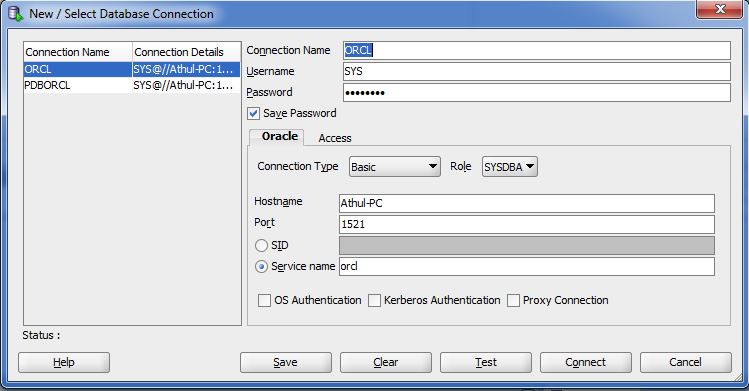
Scenario: Trying to connect to a pluggable database in Oracle 12c from a Client like SQL Developer. To connect from a remote client, we would require the following details,

Host name: This is the host name of your database server

Service name:  This is the service name of your database. 

Port number: The port number to connect to database.

The host, port and service name can be found by going to the app folder. That is you have to navigate to app > oracle > product > 12.1.0 > dbhome_1 > NETWORK > ADMIN > tnsnames.ora

Inside the tnsnames.ora file you can find a entry to your server installation as below, 

Click to Enlarge
from this you can copy details to your SQL Developer or other connections, 


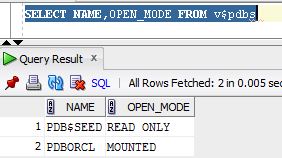
This connection remember will be your container database. To find the names of your pluggable database you can run the following query,

SELECT NAME, OPEN_MODE FROM V$PDBS;


Now if the pluggable database is Open status, you can use the same connection details replaced with pluggable database name in the connection as below,


i.e only the service name differs from the container database. 

Monday, August 22, 2016

Start Oracle 12c pluggable database : PDBORCL

So with a default installation of Oracle 12c, you get a container database as well as a pluggable database. The default name for the pluggable database is 'PDBORCL'.

For those of who you have installed Oracle Business Intelligence 12c would know that the metadata schemas for 12c cannot be installed on a container database. You will need a pluggable database to store these metadata schemas. With default installation you get a pluggable database by the object name 'PDBORCL'. So if you haven't written a database trigger statement to start your pluggable database on Oracle 12c what happens is that only the container database gets started.  The result is that the web service is not able to connect and gather metadata from these two schema's and startup fails. 

So here is how to check the status of your pluggable database and how to mount/open it. To check the status of the pluggable database, first open sqlplus,

once you have opened sqlplus login as the SYS user and once connected run the following query,

SELECT NAME, OPEN_MODE FROM V$PDBS;
Status of Pluggable databases.
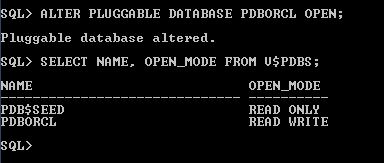
This will give you the list of pluggable databases on your 12c installation. To startup or mount the same, you have to run the following command,

ALTER PLUGGABLE DATABASE ALL OPEN;
or
ALTER PLUGGABLE DATABASE PDBORCL OPEN;

Pluggable Database open command.
Now you can see that the status has changed to read write.