Showing posts with label OBIEE 12c Administration. Show all posts

Monday, September 25, 2017

Oracle Target Data Warehouse Schema gets Locked out Intermittently. [SOLVED]

Issue: The Oracle Target Data warehouse schema, with dimensions and facts that OBIEE  or analytics engine access gets locked out intermittently. 

Cause: Oracle account lockouts can happen due to multiple reasons in a Data warehouse environment, 


  1. Multiple failed login attempts from a client trying to access the database. 
  2. Password expiry date has already passed. 
  3. One or more of clients accessing the system has an old password, which it uses to connect to the system.
Solution: The best solution here would be to check all jdbc/odbc/OCI connections where you have saved the schema username and password. This could be anything from connection settings in the analytics engine, parameter files, database links etc. The chances are high that at one of these connections we have provided an incorrect or old username/password combination.  This blog suggests to check the listener log on the database server hosting the schema. 

If you are using OBIEE, check the RPD connection, JDBC connection you have created to the target schema on the BI Publisher engine etc. 

It is an extremely poor solution to increase FAILED_LOGIN_ATTEMPTS parameter at the profile level as this increases the risk of a brute force attack on your database or schema. 


Tuesday, March 7, 2017

OBIEE security LDAP realm provider JAAS Control Flag options

LDAP Configuration Control Flag Option
When you create a new LDAP, Active directory(ADSI) provider to realm in Weblogic Console, you will be able to see an option called 'Control Flag' with the below four set of choices under provider, 
  1. Optional
  2. Required
  3. Requisite
  4. Sufficient
This post we can discuss on the four types of flags and how authentication is carried when each one of them is set to true. 


Optional - In optional setting, either of the two providers should have the username/password used to login. The authentication should return success in either one of them. Authentication provider is not always called. If the first authentication provider returns true then authentication ends there. 

Required - Required is the default option configured in weblogic, when you have no other providers other than weblogic provider. In this type of control flag, the user must pass authentication in all providers. If there are 5 providers with control flag, 

Requsite - User must pass authentication test with the particular provider. Other providers are also tested. 

Sufficient- When you create a new provider to existing LDAP, user required to pass at atleast one provider. If one is a successful authentication, then authentication is completed.  

Note: For existence of Custom LDAP and obiee realm, SUFFICIENT' should be opted for. 


Friday, December 9, 2016

OBIEE Analysis View Display Error Maximum cells exceeded Error EY692ZW9 [Solved]

Issue: When trying to export a OBIEE Analysis to 

View Display Error Maximum total number of cells exceeded (Configured Limit: 50000). Error Codes: EY692ZW9

Cause: Max rows parameter and tag not set at instanceconfig.xml file.

Solution: In the instance config file at 

/user/app/oracle/product/fmw/12.2.1/user_projects/domains/bi/config/fmwconfig/biconfig/OBIPS add a sub tag under <pivot> and <table> tags.

Set this parameter accroding to your requirement. We wanted to take some very big excel files and hence set the same as below,


<MaxCells>Value</MaxCells>

For the same to get effected you must once restart the BI Presentation service from Enterprise Manager. 


Tuesday, November 29, 2016

Significance of nohup command for Weblogic/OBIEE in Unix/Linux ?

So you must be knowing that you can start an OBIEE server on linux with the following two commands, 

  • ./start.sh


  • nohup ./start.sh > start_1.log
So why use the nohup command when you can directly run the shell script without it. The basic difference between the two is that when you run a shell script with nohup, even after logging out from the terminal it runs in the background. This is not the case with direct execution, where when you close the terminal the process is also aborted. 

For an example, if we startNodeManager.sh file with direct  execute command, you will be able to see the log of how it is starting up. The nodemanager will eventually startup. The problem with this is that when you close the terminal, the nodemanager will go down. Inorder to avoid this what you can do is to run the shell script with nohup command. 

With nohup command the linux process is not aborted when the terminal is closed. So when you run nodemanager with a nohup appended command. It tells the server to run the process in background.  

There is two ways to write the nohup command for executing scripts.
  • nohup ./start.sh
The above command will create a file named nohup.out in the same folder where the logs of the execution will be written to. 

  • nohup ./start.sh > start_29112016.log
The above command writes to a file named start_29112016.log . 

I am new to linux, so any suggestions are welcome. Please feel free to write your comments below. 


Tuesday, November 1, 2016

Print Tick Mark in Oracle SQL Query [Solved]

Issue: Client wanted a column to have a condition in a way that if it is a 'Y' flag then a tick mark should be shown. This was a flat file report.

Resolution: You can't exactly call this a resolution but here is what you can do, As a workaround we searched for a character that matched, we found that in the Western Europe (DOS/OS2-437/US) character set. The 251th character is a symbol that resembles a tick mark.

SELECT CHR(251) FROM DUAL 

You will have to check in a DOS/OS2-437/US characterset database to find an exact match. This character will not be available in the most commonly used WE8ISO8859P1 and AL32UTF8 character sets.

Since our report was based on a case condition we wrote it inside a case statement,

SELECT CASE WHEN 1=1 THEN '√' ELSE NULL END

Another alternative is to use the symbol in query below,

SELECT '✓' FROM DUAL

We wrote the case statement and output data to flat file. The change reflected in Flat File as well. This is a work around, make sure the workaround is properly committed to client to avoid last minute issues.


Note: You will not be able to insert the data to a table with character set other than DOS/OS2-437/US.

Kindly comment if you have any other work-around which would work better. 


Wednesday, October 19, 2016

OBIEE 12c Analytics Login Authenitcation Failure - NQODBC nQSError: 10018 [SOLVED]

This is one of the issues that took up a lot of time of ours.

Issue: OBIEE throws the following error when trying to login to analytics using weblogic username and password.

[OBIPS] [NOTIFICATION:1] [] [saw.securitysubsystem.checkauthentication.runimpl] [ecid: 667216e2-5177-4c25-86d2-b97ad8d56fa7-000002b2,0:1:1] [tid: 1830131456] [SI-Name: ] [IDD-Name: ] [IDD-GUID: ] [userId: ] Authentication Failure.
Odbc driver returned an error (SQLDriverConnectW).
State: 08004.  Code: 10018.  [NQODBC] [SQL_STATE: 08004] [nQSError: 10018] Access for the requested connection is refused.
 (08004)
State: HY000.  Code: 43113.  [nQSError: 43113] Message returned from OBIS.
 (HY000)
State: HY000.  Code: 43126.  [nQSError: 43126] Authentication failed: invalid user/password. (HY000)[[
File:checkauthentication.cpp
Line:1534
Location:
saw.securitysubsystem.checkauthentication.runimpl
saw.threadpool.asynclogon
saw.threads
]]


Cause: We spent a lot of time trying to find the root cause of the issue. We checked metadata schemas, boot.properties, multiple restarts, created new users and many others. The actual cause was that we have two LDAP's defined, one default weblogic LDAP and the other client LDAP server. 

The problem was that the Client LDAP server was throwing a connection error while trying to connect. The LDAP server administrator credentials were changed.  

The authentication process first checks credentials against client LDAP. Which refused the connection and hence the error,

Code: 10018. [NQODBC] [SQL_STATE: 08004] [nQSError: 10018] Access for the requested connection is refused.

Resolution: Update the Client LDAP providers with the latest credentials and then restart the server. 

Another work around is to change the client LDAP provider control flag to optional.

Monday, August 22, 2016

Start Oracle 12c pluggable database : PDBORCL

So with a default installation of Oracle 12c, you get a container database as well as a pluggable database. The default name for the pluggable database is 'PDBORCL'.

For those of who you have installed Oracle Business Intelligence 12c would know that the metadata schemas for 12c cannot be installed on a container database. You will need a pluggable database to store these metadata schemas. With default installation you get a pluggable database by the object name 'PDBORCL'. So if you haven't written a database trigger statement to start your pluggable database on Oracle 12c what happens is that only the container database gets started.  The result is that the web service is not able to connect and gather metadata from these two schema's and startup fails. 

So here is how to check the status of your pluggable database and how to mount/open it. To check the status of the pluggable database, first open sqlplus,

once you have opened sqlplus login as the SYS user and once connected run the following query,

SELECT NAME, OPEN_MODE FROM V$PDBS;
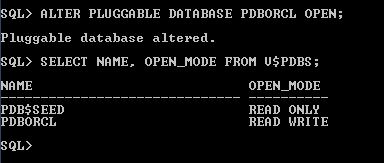
Status of Pluggable databases.
This will give you the list of pluggable databases on your 12c installation. To startup or mount the same, you have to run the following command,

ALTER PLUGGABLE DATABASE ALL OPEN;
or
ALTER PLUGGABLE DATABASE PDBORCL OPEN;

Pluggable Database open command.
Now you can see that the status has changed to read write.

Monday, July 25, 2016

OBIEE 12c Client Administration tool OCI DB connectivity issue

Issue: We were trying to make a connection to Oracle database to import metadata to the OBIEE repository.

Cause: The tnsnames.ora file not present in MW_HOME/network/admin

Resolution:  Even if you have tnsnames.ora in your app folder in your database client folder, you need to have a copy of the same tnsnames.ora file at network/admin folder inside MW_HOME folder created by OBIEE.

So copy the tnsnames.ora file to this location or create a new one and try restarting the Administration tool before trying again. Let us know if you are still facing issues in the comments. 

OBIEE/Weblogic 12c Node Manager Startup Error - DemoIdentity.jks file missing [Solved]

Here is an issue we faced while trying to startup the Node manager in Oracle Business Intelligence 12c when we trying to start the nodemanager service. The issue is caused by a java keystore file missing from a location inside middleware home folder. 

Issue: DemoIdentity.jks keystore file missing from the security folder inside nodemanager folder, i.e at the path

 FMW_HOME/oracle_common/common/nodemanager/security

weblogic.nodemanager.common.ConfigException: Identity key store file not found: Middleware/Oracle_Home/oracle_common/common/nodemanager/security/DemoIdentity.jks Cause: The DemoIdentity.jks file missing from the security folder for nodemanager.

Resolution:

The DemoIdentity.jks file would be available at the folder,

FMW_HOME/user_projects/domain/bifoundation/security

Copy the file from this folder to inside the secuirity folder for NodeManager. Once you have copied the file, try restarting the nodemanager. It worked well for us.