Showing posts with label Oracle 11g. Show all posts

Friday, October 13, 2017

Oracle Dual Table alternative equivalent in Microsoft SQL Server

Here is another post addition to the Oracle to Microsoft SQL Server series, This time we discuss about the DUAL table feature that is available in Oracle. However SQL server doesn't support queries on DUAL table as it is not present in the database. 

SELECT 1 FROM DUAL  returns invalid object name error in MSSQL Server.  -

Msg 207, Level 16, State 1, Line 1
Invalid column name 'SYSDATETIME'.

Dual object invalid in MS SQL Server.

Dual table is a one row table that Oracle provides where you can do one row calculations, use to display SYSDATE, test functions with default values etc. eg:- 

SELECT SYSDATE FROM DUAL - returns the system date from the database server. 
SELECT (9*50) FROM DUAL; - returns 450
Solution or Alternative to DUAL in MS SQL server is as below,  

In MSSQL, Any function, calculation, string after SELECT works, Please find the below examples along with screenshot.

SELECT GETDATE()  - returns the system date.
SELECT (9*50) - returns 450 
SELECT  'Hello World' 

Dual alternative in SQL Server.

An alternative to this syntax is to create a DUAL table in MS SQL server with the Dummy column and value 'X' under it. However you have to make sure you that all the users have access this to table to be used just as in Oracle database.

Tuesday, October 10, 2017

Performance difference between != and <> for NOT EQUAL filters in MSSQL / Oracle

Question: Is there a considerable performance improvement when using <> over the != operation in Microsoft SQL Server or Oracle Database ?

Answer: The answer is 'NO'. I had from somewhere heard the same that the <> operator performs better than the != operator. The < > operator for NOT EQUAL to can be preferred as the <> syntax is ANSI compliant unlike the != operator. Chances are when you migrate the same code to a different database, the <> operator is more likely to work without any compilation errors. 

So use <> operator instead of != as it is ANSI compliant and will help you reduce probable effort if a database migration happens. 

References: Stack Overflow


Tuesday, September 26, 2017

CREATE TABLE from SELECT query in Microsoft SQL Server


Scenario: Oracle has spoiled us so much, We recently came across a scenario where we wanted to have the result set of a SQL query to be saved as a table. In Oracle we have the following syntax to achieve the same,


CREATE TABLE STUDENTS AS SELECT STUD_ID, STUD_NAME FROM STUDENT;

This syntax would create me a table instantly, which I would be able to refer elsewhere. The same feature is available in Microsoft SQL Server as well, just that the syntax is different.  

Resolution: The SQL server equivalent of the above query would be as below, 


SELECT A.* INTO STUDENTS FROM( SELECT STUD_ID, STUD_NAME FROM STUDENT) A
syntax: 

SELECT A.* INTO Insert_Table_Name FROM 

Your query here.
) A

Note that you need not create the table upfront before running this script. The query creates the table and it's structure based on the result set.

We hope this came of help to you. For more such posts relating Oracle and Microsoft SQL Server check the label - Oracle to SQL Server . 

Monday, September 25, 2017

Oracle NVL equivalent in MS SQL Server - COALESCE

Oracle to Microsoft SQL Server
As I am new to the Microsoft SQL Server, I have decided to do a series on Oracle to SQL Server comparison. So here is one new keyword which I learned the other day.

Scenario: I had this scenario where I am supposed to show an email address of an insurance dependent, if this dependent email id is not updated then we should fetch the email id of the parent. If in Oracle I would have gone for the NVL function or a CASE statement to achieve the same. If it just comparing maybe two to three columns then a CASE statement would suffice. What if we had more than 10 columns in a way that we have to show data if one of these 10 columns are having data. 

Solution: In this scenario I could go for the COALESCE function in Microsoft SQL Server as the it doesn't provide the NVL function and anyways the COALESCE function performs better than NVL in Oracle and makes your code simpler. 

eg: Imagine we have a CUSTOMER table with 4 email address columns, EMAIL_1, to EMAIL_10.  we have to return the first available data among these columns checking serially. If in Oracle we could have gone for the below syntax,


SELECT NVL(EMAIL_1,NVL(EMAIL_2,(NVL(EMAIL_3, NVL(EMAIL_4,'Not available,),,'Not available,),'Not available,),'Not available,) EmailId
FROM CUSTOMER

As you can see the code is messy and may take time to understand. But SQL Server provides you a function for such a scenario called the COALESCE function, which does the same for you. The above result in COALESCE would look like below, 

SELECT COALESCE(EMAIL_1,EMAIL_2,EMAIL_3,EMAIL_4) EmailId FROM CUSTOMER.

Use of the function makes way for simpler and clean code. The COALESCE function converts your code to a CASE function and executes the same. The difference with ISNULL function is that the ISNULL function is executed only once where as COALESCE is executed until a non NULL argument is reached. 

Hope this came of help to you. Happy coding. 

Oracle Target Data Warehouse Schema gets Locked out Intermittently. [SOLVED]

Issue: The Oracle Target Data warehouse schema, with dimensions and facts that OBIEE  or analytics engine access gets locked out intermittently. 

Cause: Oracle account lockouts can happen due to multiple reasons in a Data warehouse environment, 


  1. Multiple failed login attempts from a client trying to access the database. 
  2. Password expiry date has already passed. 
  3. One or more of clients accessing the system has an old password, which it uses to connect to the system.
Solution: The best solution here would be to check all jdbc/odbc/OCI connections where you have saved the schema username and password. This could be anything from connection settings in the analytics engine, parameter files, database links etc. The chances are high that at one of these connections we have provided an incorrect or old username/password combination.  This blog suggests to check the listener log on the database server hosting the schema. 

If you are using OBIEE, check the RPD connection, JDBC connection you have created to the target schema on the BI Publisher engine etc. 

It is an extremely poor solution to increase FAILED_LOGIN_ATTEMPTS parameter at the profile level as this increases the risk of a brute force attack on your database or schema. 


Friday, March 11, 2016

ODI 11g - Incremental Update load using Surrogate Key [Solved]

In one of our projects we had a scenario where we had to load data from an Oracle source to an Oracle target. We faced a lot of issues during the process. Then we came across Himu's blog post on the same, which saved us a lot of hours and frustration.

Below are some key pointers to note when using Incremental Update.
  • Do not make the Surrogate Key as Primary key in your Target Table.
  • Make the Natural Key as the Primary Key. 
  • Check Insert only for Surrogate Key and Natural Key
  • Disable 'Check not null' key on Mapping editor for Surrogate Key.  
ODI Mapping Quick edit screenshot - Refer for first four points
In the above diagram ROW_WID is the surrogate key and ROW_ID the natural key.
  • Make the Natural Key as the Update Key in flow tab.

This worked for us. Let us know if this helps. 

Do check out the Mhimu's blog post at https://mhimu.wordpress.com/2009/05/04/odi-incremental-update-and-surrogate-key-using-database-sequence/

Monday, February 22, 2016

Group all Textual Attributes under a Key to a Single Column

Requirement: The requirement is to group all Countries under a Region into a single column. Consider the table below, which has a number of countries under a given Region Id.


Expected Output: The expected output is to group all country names under a region into a single column as shown below,


Resolution: There is a pre-default function in Oracle that supports this known as List Aggregate function.

The syntax of List Aggregate Funtion is as below,
SELECT COLUMN,LISTAGG(COLUMN_NAME, '| ') WITHIN GROUP (ORDER BY COLUMN_NAME DESC) ALIAS_NAME
FROM TABLE
GROUP BY COLUMN_NAME
The query for our solution would look as below,
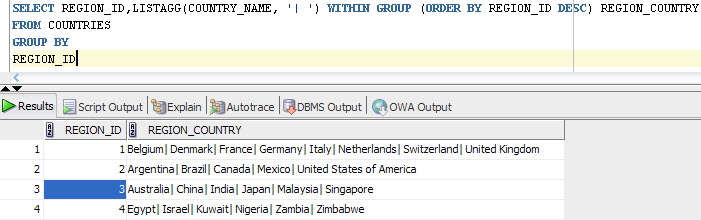
SELECT REGION_ID,LISTAGG(COUNTRY_NAME, '| ') WITHIN GROUP (ORDER BY REGION_ID DESC) REGION_COUNTRY
FROM COUNTRIES
GROUP BY REGION_ID
List Agg Output

Tuesday, November 17, 2015

[Oracle11g] Database Table Locked Out - ORA00054 - [SOLVED]

Issue: Unable to drop a Table in Oracle 11g. Error ORA-00054: resource busy and acquire with NOWAIT specified or timeout expired.


Cause: The table object is locked out in the Oracle 11g Database.

Resolution: Killing the request serial# is the resolution to this issue and unlocking the Oracle Database table.

Find the locked object from the Oracle Database using the following query ,
select * from DBA_OBJECTS where OBJECT_NAME='TABLE_NAME'


Get the Object ID from this table

select * from V$LOCKED OBJECT where OBJECT_ID='OBJECT_ID_HERE';

From the above query get the SESSION_ID and run the following query to find the serial # for this session,


Now run the following query to kill the Session, the syntax is as below,

ALTER SYSTEM KILL SESSION 'SID,SERIAL#';


Easy Solution:

Alternatively run the following query to find the SID and SERIAL # for the particular database object as seen in screenshot below,

SELECT OBJ.OBJECT_ID,OBJ.OBJECT_NAME, VSES.SID, VSES.SERIAL#
FROM V$LOCKED_OBJECT VLOCK,
V$SESSION VSES,
DBA_OBJECTS OBJ
WHERE
VLOCK.SESSION_ID = VSES.SID
AND VLOCK.OBJECT_ID = OBJ.OBJECT_ID
AND OBJ.OBJECT_NAME ='Your_Object/Table_Name_Here'

Now use the below query to kill session,

ALTER SYSTEM KILL SESSION 'SID,SERIAL#';

Saturday, October 31, 2015

Oracle 11g R2 32/64bit Client Installation Steps

Here is how to proceed installing an Administrative database client for an Oracle 11g Database. Go the client setup folder and run the setup.exe file as Administrator.

Select the type of Installation of Client, Choose the Administrator option as seen in screenshot below.

Give necessary details to the Software updates and Product language step and proceed to Installation location step. Proceed with default as seen below or give a custom location for the same.

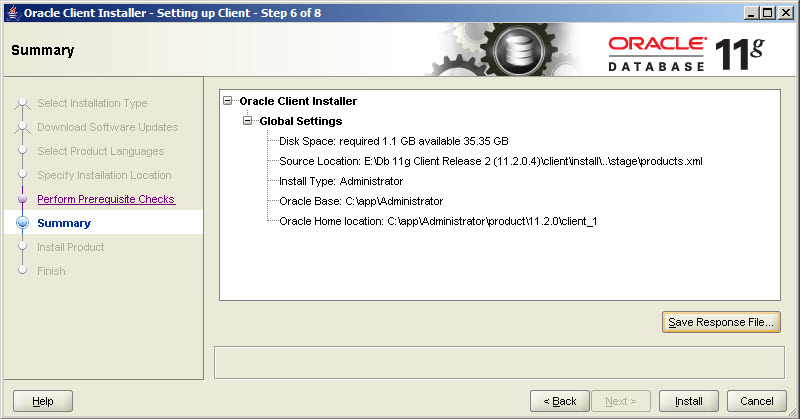
The installation will give a summary of the installation process before it starts. Save a response file for later reference of the installation. 

Wait for Installation to finish. 


Now to check the installation, go to Run and type sqlplus 

Check the header of the command prompt window to see the location of the sqlplus if this is from the client_1 folder then installation is successful. 


Oracle 11g R2 Server Database Installation Steps

Follow the below steps to Install and configure an Oracle 11g R2 Enterprise Edition on Windows Server 2008. Run the setup.exe file inside the setup folder as administrator. 

At the third step select 'Create and Configure a database' as shown in the below screenshot,

The next step is to select the system class for installation, choose server class since we are creating a server database. Refer screenshot below,
Since we are not going for a clustered installation select 'Single instance database installation'. 

Select the type of Installation as Typical Install. Choose Advanced install if you want to particularly configure database to detail. 

At the next step provide details such as directory location, database name, administrative password for SYS user etc and proceed. Refer screenshot below. 

The installation will check if the environment meets minimum requirements for installation of R2 Server. 

Before Installation step is started, a summary of the Installation will be displayed. It is recommended to save this Response file for future reference. 

Installation will proceed and finish.

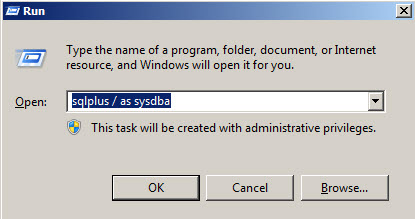
Once the Installation is complete, go to Windows > Run and type 'sqlplus / as sysdba' and click ok.

A new sqlplus command prompt will be opened and give a sample query to ensure that the database has been connected.

If at any step the Installation fails check the Oracle 11g Database logs to debug.

Friday, October 9, 2015

Oracle 11g: Get a list of all Indexes defined for table/schema

This is how you can get a list of all indexes defined on a particular table or the number of indexes on tables inside a particular schema.

For a particular table,
SELECT * FROM ALL_INDEXES WHERE TABLE_NAME='YOUR_TABLE_NAME'
For a particular schema,
SELECT * FROM ALL_INDEXES WHERE TABLE_OWNER='YOUR_SCHEMA_NAME'

Thursday, October 8, 2015

[Solved] sqlplus / as sysdba not working

Earlier in one of our previous posts we had discussed how to login to Oracle 11g Database as the SYS user without credentials. However this doesn't apply everywhere, chances are that you might have come across this error as shown below,

Login as SYSDBA

Error
Cause: This is because the Windows user you have used to login is not a part of the ORA_DBA group. 

Resolution: The issue can be resolved by adding the user to the ORA_DBA group as described in the steps below,

  1. Go to Administrative Tools > Server Manager 
  2. Inside the Server Manager > Configuration > Local Users and Groups > Groups locate the ORA_DBA group 
  3. Open the ORA_DBA group and add the windows user to the group as seen below,
  4. Check again with the sqlplus / as sysdba command again after you have added the user to the group and the issue will be fixed as below,
    SQLPlus logged successfully as SYSDBA user

[Solved] Forgot SYSDBA credentials for Oracle 11g

This is a really helpful tip incase you forgot the password to the SYSDBA user in your Oracle 11g Database. You can use the following syntax to login to the server as SYSDBA from RUN,
sqlplus / as sysdba

Login to SQLPlus without SYS credentials
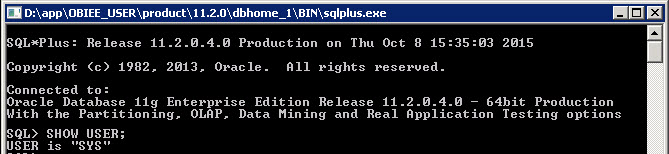
This would open SQLPlus as shown below and you can test the same by running the command SHOW USER

Logged into SQLPlus and test the name of the current user.
Note: This will only work if the Windows User is a part of the ORA_DBA user group. 

Wednesday, September 16, 2015

Oracle 11g Database Installation Log Files and Location

The installation log files of an Oracle 11g Database installation can be found at the following location,

C:\Program Files\Oracle\Inventory\logs

In this folder you will be able to find 3 files as seen below,

Oracle log file directory containing log files.
  1. installActions<Timestamp>.txt - logs the installation steps and details
  2. oraInstall<Timestamp>.err - logs the errors encountered during the installation
  3. oraInstall<Timestamp>.out 

Wednesday, September 9, 2015

Oracle BI Applications hardware requirements document

Scenario: We were looking out for a document to get the minimum recommended hardware configuration for OBIA 11g. Since this was for a demo purpose we required to install OBIA Apps and target database/data warehouse in the same node. 

This is from a technical note we came across in Oracle Support.

OBIA Apps 11g


Target Database


Link to the technical note: - https://goo.gl/M38toV 

Sunday, August 23, 2015

[Oracle 11g] Run a SQL Script from SQLPlus

Scenario: So there was a set of sql scripts to be executed into my database in order to work on a training session. Instead of copy pasting each script to SQL Developer and then running it. We thought of saving time by executing it from SQL Plus.

Resolution: Place your .sql extension file with the script at a particular folder in your system.

Now go to run and open sqlplus. Connect as a user with SYSDBA or DBA privileges since it is highly likely that this scripts will contain DDL statements like create, alter, or drop.

After connecting to SQLPlus as SYSDBA user, Enter the following in the command line

SQL > @PATH/FILENAME.sql

where PATH specifies the path where the sql file resides and FILENAME the name of the sql file script to be executed. We created a sql script named test.sql with content as shown below.

Sample SQL Script
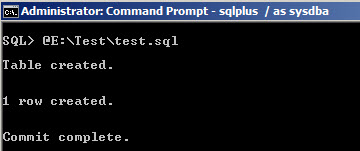
 Save the file and copy the folderpath/filename.sql and go to cmd and paste it as shown below


SQL Script output after execution

Saturday, August 22, 2015

[Solved] Oracle TNSPING Resolve Name Error (TNS-03505)

Scenario: Issue while connecting to SYS schema in a newly installed database from SQL Developer. So we tried to TNSPING the ORCL connection and we faced a 'failed to resolve name' error as below,


Failed to Resolve Name.
Cause: The issue is because we had both Oracle DB Home and Client installed. The tnsnames.ora file was present only in the network/admin folder in DB_Home and not in Client/network/admin 

Resolution: Copy the tnsnames.ora file and paste a copy to the network/admin folder in client installed directory. Try again as below and connection will be fine.

Error resolved.

Friday, August 21, 2015

[Oracle11g] Set Oracle Database User Account and Password to Never Expire

Here is a small tip on how to create a new user in Oracle 11g and set the password to never expire. This would come in handy when you are creating new metadata schema's for OBIEE, when for long time these schema's are not in use they tend to get locked and OBIEE services will fail to start.

So in order to avoid this scenario it is better to create a new Oracle user profile and set the parameters to unlimited. Please follow the steps below

After you create a new Oracle user, say for example OBIUSER then the next step is to create  a new User Profile OBIUSER_PROFILE as below
CREATE PROFILE OBIUSER_PROFILE LIMIT
COMPOSITE_LIMIT UNLIMITED
SESSIONS_PER_USER UNLIMITED
PASSWORD_LIFE_TIME UNLIMITED
FAILED_LOGIN_ATTEMPTS UNLIMITED
PASSWORD_REUSE_TIME UNLIMITED
PASSWORD_REUSE_MAX UNLIMITED
PASSWORD_VERIFY_FUNCTION NULL
PASSWORD_LOCK_TIME UNLIMITED
PASSWORD_GRACE_TIME UNLIMITED
CPU_PER_SESSION UNLIMITED
CPU_PER_CALL UNLIMITED
LOGICAL_READS_PER_SESSION UNLIMITED
LOGICAL_READS_PER_CALL UNLIMITED
IDLE_TIME UNLIMITED
CONNECT_TIME UNLIMITED
PRIVATE_SGA UNLIMITED;
If you check the DDL statement above you can see that we have set properties like PASSWORD_LIFE_TIME, PASSWORD_LOCK_TIME, FAILED_LOGIN_ATTEMPTS to unlimited. Hence all the users having this user profile will never get expired. 

The next step is to assign this new User Profile characteristic to the new user OBIUSER,

ALTER USER OBIUSER PROFILE OBIUSER_PROFILE;
Now this user/schema password will never expire. 

References: Oracle Docs

Friday, May 22, 2015

[Oracle11g] Materialized View Drop Statement Timeout Issue


Issue:  Unable to Drop Materialized View (Session Timeout).

Description:  DROP Statement not working and session getting timed out

Resolution:
1.       Check whether locks exist on Materialized Views in OLAP Database using the following query:
SELECT LCK.SID , LCK.TYPE,  GVSES.SERIAL#
FROM
V$LOCK LCK,
GV$SESSION GVSES
WHERE
LCK.SID =GVSES.SID(+)
AND LCK.TYPE='JI' 

Note:  V$LOCK – A view lists the locks currently held by the Oracle Database.
GV$SESSION – A view containing Session info.
               
 TYPE Column in V$LOCK implies Type of Object on which Lock exists ‘JI’ is for Materialized View Locks.

Other lock types are as follows: JI (Materialized view)
                                                   TM (DML or Table Lock)
                                                   TX (Transaction)

2.    Get SID and SERIAL# from the first query and run the following query on the database.

Syntax: ALTER SYSTEM KILL SESSION 'SID,SERVICE#' IMMEDIATE;

SID and SERVICE # will be replaced with values from first query.

 Example:  ALTER SYSTEM KILL SESSION '159,87' IMMEDIATE;
3.       After killing all locks on Materialized Views run the DROP Statement again. Worked for us.