Showing posts with label SQL. Show all posts

Wednesday, May 30, 2018

SAP Data Services SQL Transform with variable - Invalid Pseudocolumn error [Solved]

Scenario: I had a scenario where in I needed to achieve a lead, lag column logic in BODS and had to do with a SQL Transform. Here I have a filter on date, i.e filter CreateDateTime column less than extract date. So I have a variable $PV_ExtractDate where in I pass my extract date value.

which would make my query look something as below,

SELECT COL_A, COL_B FROM SALES WHERE CreateDateTime < $PV_ExtractDate

The above syntax in SQL Transform was creating an error for me as the value was not being passed to the variable.

Error: SQL submitted to ODBC data source <SAMPLE> resulted in error <[Microsoft][SQL Server Native Client 11.0][SQL Server]Invalid pseudocolumn "$PV_ExtractDate".>

Cause: BODS doesn't recognize $PV_ExtractDate as a variable value in SQL Transform, this can be corrected by using the following syntax,

SELECT COL_A, COL_B FROM SALES WHERE CreateDateTime < {$PV_ExtractDate}
Note: It is advised not to go with a SQL Transform, unless no workaround is feasible in SAP BODS. This is because you are writing code that is specific to a particular database, hence if the source system is changed to a new type of database an issue might occur.

Monday, October 23, 2017

Conditional OR joins in SQL query returns duplicate rows

Scenario: Whenever I have a particular OR condition join in my query, I get a duplicated record. The case is when the two join conditions before and after OR are satisfied.

SELECT A.Column1,A.Column2, Name, Address FROM A, B
WHERE (
(A.COLUMN1 = B.COLUMN1) OR (A.COLUMN2  = B.COLUMN2)
)

Cause: Imagine there are rows in A and B that satisfy the two join conditions used in OR, In such a scenario the database will return two rows with same value.


Here as per the query, for row 'Athul' in Table A, both the join conditions match with B and hence will return below output resultset,


As you can see in the result above, 'Athul' is resulted twice.  However for the second recrod

Solution: This can be avoided by using a LEFT join instead of an OR join condition. Do not consider using DISTINCT as it is a fairly cost consuming alternative.

Friday, October 13, 2017

Oracle Dual Table alternative equivalent in Microsoft SQL Server

Here is another post addition to the Oracle to Microsoft SQL Server series, This time we discuss about the DUAL table feature that is available in Oracle. However SQL server doesn't support queries on DUAL table as it is not present in the database. 

SELECT 1 FROM DUAL  returns invalid object name error in MSSQL Server.  -

Msg 207, Level 16, State 1, Line 1
Invalid column name 'SYSDATETIME'.

Dual object invalid in MS SQL Server.

Dual table is a one row table that Oracle provides where you can do one row calculations, use to display SYSDATE, test functions with default values etc. eg:- 

SELECT SYSDATE FROM DUAL - returns the system date from the database server. 
SELECT (9*50) FROM DUAL; - returns 450
Solution or Alternative to DUAL in MS SQL server is as below,  

In MSSQL, Any function, calculation, string after SELECT works, Please find the below examples along with screenshot.

SELECT GETDATE()  - returns the system date.
SELECT (9*50) - returns 450 
SELECT  'Hello World' 

Dual alternative in SQL Server.

An alternative to this syntax is to create a DUAL table in MS SQL server with the Dummy column and value 'X' under it. However you have to make sure you that all the users have access this to table to be used just as in Oracle database.

Tuesday, October 10, 2017

Performance difference between != and <> for NOT EQUAL filters in MSSQL / Oracle

Question: Is there a considerable performance improvement when using <> over the != operation in Microsoft SQL Server or Oracle Database ?

Answer: The answer is 'NO'. I had from somewhere heard the same that the <> operator performs better than the != operator. The < > operator for NOT EQUAL to can be preferred as the <> syntax is ANSI compliant unlike the != operator. Chances are when you migrate the same code to a different database, the <> operator is more likely to work without any compilation errors. 

So use <> operator instead of != as it is ANSI compliant and will help you reduce probable effort if a database migration happens. 

References: Stack Overflow


Tuesday, September 26, 2017

CREATE TABLE from SELECT query in Microsoft SQL Server


Scenario: Oracle has spoiled us so much, We recently came across a scenario where we wanted to have the result set of a SQL query to be saved as a table. In Oracle we have the following syntax to achieve the same,


CREATE TABLE STUDENTS AS SELECT STUD_ID, STUD_NAME FROM STUDENT;

This syntax would create me a table instantly, which I would be able to refer elsewhere. The same feature is available in Microsoft SQL Server as well, just that the syntax is different.  

Resolution: The SQL server equivalent of the above query would be as below, 


SELECT A.* INTO STUDENTS FROM( SELECT STUD_ID, STUD_NAME FROM STUDENT) A
syntax: 

SELECT A.* INTO Insert_Table_Name FROM 
( 
Your query here.
) A

Note that you need not create the table upfront before running this script. The query creates the table and it's structure based on the result set.

We hope this came of help to you. For more such posts relating Oracle and Microsoft SQL Server check the label - Oracle to SQL Server . 

Monday, September 25, 2017

Oracle NVL equivalent in MS SQL Server - COALESCE

Oracle to Microsoft SQL Server
As I am new to the Microsoft SQL Server, I have decided to do a series on Oracle to SQL Server comparison. So here is one new keyword which I learned the other day.

Scenario: I had this scenario where I am supposed to show an email address of an insurance dependent, if this dependent email id is not updated then we should fetch the email id of the parent. If in Oracle I would have gone for the NVL function or a CASE statement to achieve the same. If it just comparing maybe two to three columns then a CASE statement would suffice. What if we had more than 10 columns in a way that we have to show data if one of these 10 columns are having data. 

Solution: In this scenario I could go for the COALESCE function in Microsoft SQL Server as the it doesn't provide the NVL function and anyways the COALESCE function performs better than NVL in Oracle and makes your code simpler. 

eg: Imagine we have a CUSTOMER table with 4 email address columns, EMAIL_1, to EMAIL_10.  we have to return the first available data among these columns checking serially. If in Oracle we could have gone for the below syntax,


SELECT NVL(EMAIL_1,NVL(EMAIL_2,(NVL(EMAIL_3, NVL(EMAIL_4,'Not available,),,'Not available,),'Not available,),'Not available,) EmailId
FROM CUSTOMER

As you can see the code is messy and may take time to understand. But SQL Server provides you a function for such a scenario called the COALESCE function, which does the same for you. The above result in COALESCE would look like below, 

SELECT COALESCE(EMAIL_1,EMAIL_2,EMAIL_3,EMAIL_4) EmailId FROM CUSTOMER.

Use of the function makes way for simpler and clean code. The COALESCE function converts your code to a CASE function and executes the same. The difference with ISNULL function is that the ISNULL function is executed only once where as COALESCE is executed until a non NULL argument is reached. 

Hope this came of help to you. Happy coding. 

Friday, August 25, 2017

MINUS operation in Microsoft SQL Server using EXCEPT

Oracle Database vs Microsoft SQL Server

Coming from an Oracle Database background, I had a tough time getting used to some keywords in SQL Server. While most of the keywords are ANSI compliant, there are some keywords that are unique in SQL Server database. This post is to discuss one such exception with the MINUS set operator keyword which was available in Oracle, but not in SQL Server.

Issue: MINUS keyword not working in Microsoft SQL Server. I had this particular scenario, where in I was rewriting an existing query and trying to performance tune it. To make sure the same records are returned when I make changes to queries, I use the MINUS keyword in Oracle to subtract the new query from the existing one and if no rows are returned I use the new query going forward. 

I was trying to run a query similar to below,

SELECT COLUMN_A, COLUMN_B FROM TABLE_NAME
MINUS
SELECT COLUMN_A, COLUMN_B FROM TABLE_NAME

Ideally the query should give me an output with no rows as I am trying to subtract same query from itself. Instead of returning the desired output, SQL server will show me two result sets individually executed without returning an error. 

Cause: This is because SQL Server doesn't recognize the keyword MINUS.

Solution: The solution is to use the SQL Server equivalent of MINUS set operation which is the EXCEPT keyword. Below is the restructured query for the same using the EXCEPT keyword.

SELECT COLUMN_A, COLUMN_B FROM TABLE_NAME
EXCEPT
SELECT COLUMN_A, COLUMN_B FROM TABLE_NAME

The except keyword basically functions to return unique records in query on top(or left) that doesn't have an identical record in the query on the right side(bottom).

Things to take care when using the EXCEPT keyword are, 
  • All the data sets(queries) should have identical number of arguments.
  • Once the number of arguments are same between different queries, the next check is on the datatype of the arguments. The datatype order in different query sets should be same.  

Monday, February 22, 2016

Group all Textual Attributes under a Key to a Single Column

Requirement: The requirement is to group all Countries under a Region into a single column. Consider the table below, which has a number of countries under a given Region Id.


Expected Output: The expected output is to group all country names under a region into a single column as shown below,


Resolution: There is a pre-default function in Oracle that supports this known as List Aggregate function.

The syntax of List Aggregate Funtion is as below,
SELECT COLUMN,LISTAGG(COLUMN_NAME, '| ') WITHIN GROUP (ORDER BY COLUMN_NAME DESC) ALIAS_NAME
FROM TABLE
GROUP BY COLUMN_NAME
The query for our solution would look as below,
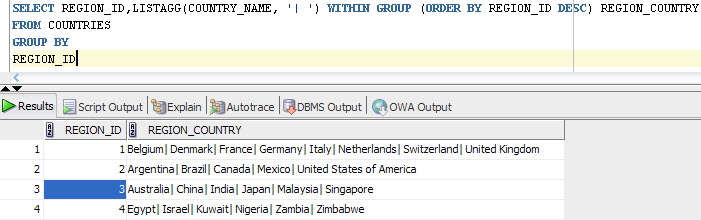
SELECT REGION_ID,LISTAGG(COUNTRY_NAME, '| ') WITHIN GROUP (ORDER BY REGION_ID DESC) REGION_COUNTRY
FROM COUNTRIES
GROUP BY REGION_ID
List Agg Output

Tuesday, November 17, 2015

[Oracle11g] Database Table Locked Out - ORA00054 - [SOLVED]

Issue: Unable to drop a Table in Oracle 11g. Error ORA-00054: resource busy and acquire with NOWAIT specified or timeout expired.


Cause: The table object is locked out in the Oracle 11g Database.

Resolution: Killing the request serial# is the resolution to this issue and unlocking the Oracle Database table.

Find the locked object from the Oracle Database using the following query ,
select * from DBA_OBJECTS where OBJECT_NAME='TABLE_NAME'


Get the Object ID from this table

select * from V$LOCKED OBJECT where OBJECT_ID='OBJECT_ID_HERE';

From the above query get the SESSION_ID and run the following query to find the serial # for this session,


Now run the following query to kill the Session, the syntax is as below,

ALTER SYSTEM KILL SESSION 'SID,SERIAL#';


Easy Solution:

Alternatively run the following query to find the SID and SERIAL # for the particular database object as seen in screenshot below,

SELECT OBJ.OBJECT_ID,OBJ.OBJECT_NAME, VSES.SID, VSES.SERIAL#
FROM V$LOCKED_OBJECT VLOCK,
V$SESSION VSES,
DBA_OBJECTS OBJ
WHERE
VLOCK.SESSION_ID = VSES.SID
AND VLOCK.OBJECT_ID = OBJ.OBJECT_ID
AND OBJ.OBJECT_NAME ='Your_Object/Table_Name_Here'

Now use the below query to kill session,

ALTER SYSTEM KILL SESSION 'SID,SERIAL#';

Monday, October 19, 2015

Find rows with Arabic/Non English Text in a Database Column

Scenario: Find and delete contact records with Arabic names from a database table.

Solution: In order to find the records we can use the query below, which will find you all records that contain non english alphabets and numbers. 

SELECT EMPLOYEE_ID, FIRST_NAME  FROM HR.EMPLOYEES WHERE NOT REGEXP_LIKE (FIRST_NAME,'[a-z,A-Z,0-9]');

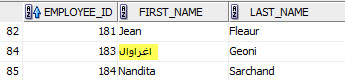
To test the same, We updated one record from the EMPLOYEES table in HR Schema to an arabic text as seen below,

UPDATE HR.EMPLOYEES SET FIRST_NAME='اغراوال' WHERE EMPLOYEE_ID=183;


Arabic text in Employees table First Name column
Now run the first query to get this particular record alone with arabic text. 


Query output

Friday, October 9, 2015

Oracle 11g: Get a list of all Indexes defined for table/schema

This is how you can get a list of all indexes defined on a particular table or the number of indexes on tables inside a particular schema.

For a particular table,
SELECT * FROM ALL_INDEXES WHERE TABLE_NAME='YOUR_TABLE_NAME'
For a particular schema,
SELECT * FROM ALL_INDEXES WHERE TABLE_OWNER='YOUR_SCHEMA_NAME'