Showing posts with label BI Publisher 12c. Show all posts

Tuesday, November 29, 2016

BI Publisher Excel Template Output Date Format Error - 0-Jan-00 [Solved]

Issue: We were facing an issue where a date column in an excel output was shown as 0-JAN-00 instead of the original date. 


Cause: The reason is that when you create the excel(xls) BI Publisher template you have given the corresponding cell format as a date. Now in our case we had to convert the date to a TO CHAR format as MM/DD/YYYY. This meant that excel was not able to identify this as a date and hence defaulted it to 00-Jan-00

Resolution: You can resolve the issue by changing the type of the cell to 'General' from the the date format by going to format cells(right click).


Try exporting excel output again and check. Let us know if this did not solve your issue. 

Read more on dates and Oracle BI Publisher at the Oracle blog. 

Monday, November 28, 2016

[Solved] BI Publisher 12c - oracle.xdo.memoryguard.XDODataSizeLimitException - Report data size exceeds the maximum limit

Issue: oracle.xdo.memoryguard.XDODataSizeLimitException: Report data size exceeds the maximum limit.


Cause: The report was having a large number of records. Which exceeded the 300 MB default data size limit for BI Publisher. In-order to overcome this we required to change the memory guard limit in BI Publisher Runtime configuration.

Resolution:
And Administration > Runtime Configuration > Data Model


Note: The values should be in bytes and not in Megabytes.If you want to give in MB or GB make the parameter values as 2GBb instead of 2 GB etc. Remember to remove the space in this case. 
  • Here increase the size for maximum report data size from default to increased value as seen in the above screenshot.
Change/Increase the parameters
  1. Maximum Report Data Size for online reports  
  2. Maximum report data size for offline (scheduled) reports 
  3. Maximum data size limit for data generation 

  • Apply the changes. 
  • Wait for confirmation that configuration has been changed successfully. 
  • Run the report again to see whether the changes have been reflected. 
courtesy: Oracle Blog

Tuesday, November 1, 2016

Print Tick Mark in Oracle SQL Query [Solved]

Issue: Client wanted a column to have a condition in a way that if it is a 'Y' flag then a tick mark should be shown. This was a flat file report.

Resolution: You can't exactly call this a resolution but here is what you can do, As a workaround we searched for a character that matched, we found that in the Western Europe (DOS/OS2-437/US) character set. The 251th character is a symbol that resembles a tick mark.

SELECT CHR(251) FROM DUAL 

You will have to check in a DOS/OS2-437/US characterset database to find an exact match. This character will not be available in the most commonly used WE8ISO8859P1 and AL32UTF8 character sets.

Since our report was based on a case condition we wrote it inside a case statement,

SELECT CASE WHEN 1=1 THEN '√' ELSE NULL END

Another alternative is to use the symbol in query below,

SELECT '✓' FROM DUAL

We wrote the case statement and output data to flat file. The change reflected in Flat File as well. This is a work around, make sure the workaround is properly committed to client to avoid last minute issues.


Note: You will not be able to insert the data to a table with character set other than DOS/OS2-437/US.

Kindly comment if you have any other work-around which would work better. 


Monday, October 31, 2016

BI Publisher CSV Ouptut showing number incorrectly as Exponential E+ [Solved]

Issue: We were trying to export a data set as CSV output using BI Publisher. The problem we faced is that when we take the output, One column which was having a large number (close to 16 digits) was showing up as an Exponential (E+). You can see a screenshot of the output below when opening the CSV file in a notepad.

Exponential values 

Cause: The issue is because the datatype was double. Double in BI Publisher gets changed to Exponential at time of output generation. 

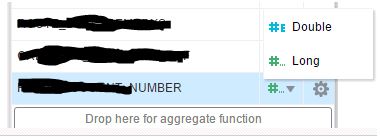
Resolution: The solution is fairly simple. You go to your data model and change the column datatype to Long instead of double. 


Now try again generating the CSV output. This worked well for us.