Showing posts with label Data Warehouse. Show all posts

Tuesday, July 6, 2021

Synapse - CREATE TABLE as SELECT with Distribution - Not recognized error [Solved]

Scenario: While trying to create a backup of a table in one Synapse schema into another backup  table  in another schema,  

example syntax below,


Msg 103022, Level 16, State 1, Line 4
Parse error at line: 2, column: 8: DISTRIBUTION is not a recognized table or a view hint.Msg 103022, Level 16, State 1, Line 4 
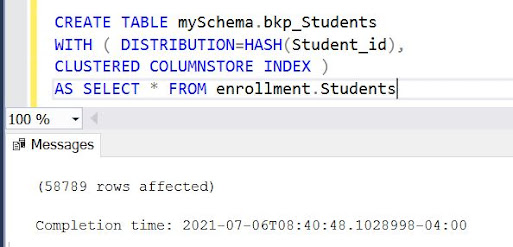
Parse error at line: 2, column: 8: DISTRIBUTION is not a recognized table or a view hint.


Solution: To resolve the issue change the syntax from existing 

CREATE TABLE mySchema.bkp_Students AS SELECT * FROM enrollment.Students

WITH ( DISTRIBUTION=HASH(Student_id)

CLUSTERED COLUMNSTORE INDEX )  


to

CREATE TABLE mySchema.bkp_Students 

WITH ( DISTRIBUTION=HASH(Case_id),

CLUSTERED COLUMNSTORE INDEX )  

AS SELECT * FROM enrollment.Students


A table needs to have a default distribution before data can be inserted into it.

Monday, July 27, 2020

Difference between AS-WAS and AS-IS reporting in a Data Warehouse

Every DWH/ETL developer should be well versed about this concept, I was a couple of days back explaining the same to a person new in our team. That's when it struck me, why not a post on the same, so here goes. I will try to explain the same, giving an example.

Imagine a customer making monthly payments to a bank loan each month from January 2020 till May 2020, where at the end of the month of March, he changed his Address, he moved to a new county/district. This information will be captured in Customer dimension in EDW as below,

Customer Dimension in EDW Example


So you have your first customer record, which expires on 31st March, and a new record,which is currently active from 1st April 2020 till high end date.

Now imagine we have a transaction table as below with the 5 payment transactions as discussed before from January 2020 till May 2020, so customer has made 3 payments at his first address and the rest 2 at his new address.

Loan Payment Fact - ASIS ASWAS concepts

Let us discuss now the AS-IS and AS-WAS concepts with this dataset, most EDW/Reporting systems use "AS-WAS" concept for grouping, as per this, suppose you are grouping the payment amount based on DISTRICT column in "AS-WAS", the result set would look as below,


So as you can infer from the result set above, in AS-WAS grouping, the snapshot as of Transaction date gets reported, i.e when T1, T2 and T3 payments were made, the customer was at Trivandrum, and later when T4 and T5 payments were made, he moved to Cochin.

However in "AS-IS" reporting, all payments are reported against the current active record of the customer, hence the full amount will be reported against Cochin in this case, see result set below to understand,


In AS-IS reporting, the measures reported against dimension attributes as of current date.

Wednesday, March 1, 2017

Importance of creating separate schema for Work in ODI

We had come across an article a long while back on the significance of using a separate schema for work instead of Target schema in ODIExperts blog. We later learned from this as we could clearly see the advantage of doing the same. 

We use OBIEE as our front end tool and we could see that all the work tables of ODI for each target table would be present in the target schema. The more tables in the target schema, the more time it takes for OBIEE to process the import metadata step. Imagine you have 10 tables in your DWH target schema, if you don't define a separate work schema for each table then for one table, W_STUDENT_D you will have the following work tables also, 

C$_W_STUDENT_D, 
I$_W_STUDENT_D,
E$_W_STUDENT_D

This not only makes OBIEE import slow also it takes up table space on the target schema making database management hard. If maintained separately then you can purge all tables in the work schema at once. The worry of accidentally truncating any of your target tables are also eliminated this way. 

Another important step as they discussed is to not use the 'Stage area different from target option', which is done at the interface level. The same can be done at the physical schema in topology level, 

ODI Work Schema.
 

Using ODI Procedures to load data from Source to Target

We came across a scenario where we used ODI procedure to load data from source to target. The scenario was that we had to implement a very complex logic using sub queries in an ODI Interface. given the short timeline, we went ahead with the approach of loading the same using query in an ODI Procedure. We will discuss the same below,

An ODI Procedure has two parts, Command on Source and Command on Target,


  • ODI Command on Source is where you write the source SQL query that you use to fetch data from source. 
  • ODI Command on Target is where you write the insert script to load data into the target. 
  • Load data from one source to another source (eg: Oracle to Teradata, MSSQL to Oracle, etc)
  • The source side query can be a plain query. The number of columns in select though should match with the number columns in the insert script and their datatypes also should match. 
 eg: SELECT ROLL_NO,STUD_NAME FROM STUDENT
  • The insert script should contain bind variables to select values from the source query, the insert script for the above source query would be, 
  INSERT INTO W_STUDENTS_D VALUES (:ROLL_NO,:STUD_NAME)
  • Extremely inefficient compared to interfaces.
  • Never preferred over interfaces. Interfaces are always faster as ODI follows all standards while generating queries. Preferred for loading of tables with less volumes of data.'
  • Row by row processing happens and hence it takes longer time for data load. 
Typically the errors you get are either SQL syntax errors, Data type mismatch, column size errors, column order mismatch errors. 

Sunday, January 1, 2017

Dimensional Modelling - Loan Dimension in Banking Data warehouse - Part 1

Loan Dimension in a Banking Enterprise Data warehouse is very crucial. It is undoubtedly one of the if not biggest data warehouse dimension in a banking DW architecture. It is also of one of the most confirmed dimensions in an banking data warehouse. Loan dimension has a lot of textual attributes and also an almost equal number of measurable attributes. It is also joined to many other entities of a banking EDW. A few examples of the key entities are the following,
  • Branch 
  • Primary Customer
  • Teller
  • Loan Product
  • Time/Dates ( Maturity, Commencement, Settlement, Disbursement, Dormancy )
As we discussed before there are many textual attributes are unique to a loan dimension and few examples are listed below,

Account status,
Product Name
Settlement, Account open date, Loan Approved date, First disbursement date, Last Transaction date.

Considering the size of a loan dimension it can be split into multiple tables to improve performance and maintainability. A good way to start modelling a dimensional model is to create bus matrix as suggested by Ralph Kimball.

The bus matrix for a Loan dimension in an ideal scenario would look as below,

Bus Matrix for Loan Dimension.

The loan dimension being one of the largest entities will take up a number of columns. It is a good practice to split the dimension as follows in case it has a large number of table,

The first partition of the dimension table should have all the most commonly used attributes, like Status, Balance etc. The second partition should have all the measurable attributes like Approved amount, applied amount, and the corresponding date keys. These measures can also act as attributes in some cases. The second table can also be used as a fact in some cases. The third or the next partitions should have all the junk values related to the dimension. Advised to put all the rarely used dimension columns here. These tables can be made to one single dimension in BI tool for example with the help of Logical table sources in OBIEE.

Why we are advising this strategy is because otherwise the maintenance of this table would be down the line a headache. Imagine a table with 500 columns. A single insert statement would be of large size. Hence taking more time to execute and load into target schema.

Naming conventions, You can go ahead with standard naming conventions followed by Oracle or have one of your own. An Oracle naming standard would be,

W_LOAN_D

If you have multiple sources, Then you can have a source abbreviation also in the same name.


Wednesday, December 21, 2016

[Oracle 12c] Find Default and TemporaryTablespaces and size of Database Schemas

This is an example on how to find the default and temporary table space details of a particular schema. This comes in handy when debugging tablespace exceeded errors like ORA-01536 and ORA-00059. This types of errors are often common in data warehouses full base load scenarios.

To find the Default Tablespace and Temporary Tablespace of a particular database schema, you need to have an user with DBA/SYS privileges. After you have logged in with this particular user, run the following SQL query,
SELECT USERNAME, DEFAULT_TABLESPACE, TEMPORARY_TABLESPACE FROM DBA_USERS WHERE USERNAME IN('Schema Name Here')


Temporary Tablespace Size

Next to find the size of the temporary tablespace, To find the size of the temporary tablespace we need to query the system table DBA_TEMP_FILES, Find a sample query below
SELECT TABLESPACE_NAME, SUM(BYTES)/1024/1024 TABLESPACE_SIZE_MB
FROM DBA_TEMP_FILES
WHERE TABLESPACE_NAME IN ('Schema Name Here')
GROUP BY TABLESPACE_NAME

Temporary Tablespace Size.

Default Tablespace Size

To find Default Tablespace size you need to query the system table DBA_DATA_FILES. See a sample query syntax below, 
SELECT TABLESPACE_NAME, SUM(BYTES)/1024/1024 TABLESPACE_SIZE_MB
FROM DBA_DATA_FILES
WHERE TABLESPACE_NAME IN ('EXAMPLE')
GROUP BY TABLESPACE_NAME

Default Tablespace Size.

Data warehouse basics: What is Incremental Data Load ?

So we are back again to brush the basics. I have always felt that for a BI/DW developer to become successful he/she should have a very strong base about the basics. Here is one basic concept we hear often, Incremental load.

So what exactly is Incremental data load ?

Incremental data load is a type of data load scenario in a Data warehouse environment where the data that is updated/new are inserted to the target data warehouse with each scheduled run.

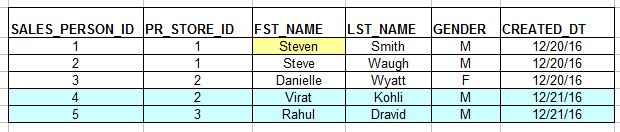
Imagine a sales person table as below which will be our source table in this case.


On the first day of loading to an EDW table, all the above three records would be moved.  The target table would be same as above. 

Now a day after they have added two new employees and also made a change to first name of a previous employee. Refer the screenshot below, 


Here with incremental update the two new records are considered and written to the target table. Also checks the source if the already existing records in EDW has any changes in source. There is the first record where FST_NAME was changed from Steve to Steven, hence this record is also considered and the change is updated in the target table. 

The advantages of incremental loads are the following,

  1. Reduces a major chunk I/O operations between source and target. 
  2. Faster than a full base load.


Wednesday, December 7, 2016

What are Columnar Databases and it's significance in Analytics/Data warehousing ?

I was recently watching a session on Amazon Redshift from Youtube, when I came to know that Redshift is a columnar database. Which Amazon boasted optimizes performance and storage to a great deal. This ended up in me wanting to know more and hence the post.

So what is a columnar database ?

Typical databases like Oracle, mySQL etc store information as rows, i.e for example the details of a particular students is stored in a row.  In columnar databases the information is stored as columns. Data in a particular column is grouped together unlike other databases where row wise data is grouped. 

Say for example I have the following raw data, 
Name: Athul
Age: 26
Sex: Male 
Location: Trivandrum

Name: Rahul

Age: 43
Sex: Male
Location Bangalore

In typical databases the data would be stored as below, 

Athul26MaleTrivandrum

Rahul43MaleBangalore

However when it comes to a columnar database, data is grouped in Columnar fashion, i.e

AthulRahul|2643|MaleMale|TrivandrumBangalore

Each column data here is stored in a separate blocks. The advantage they say is that data of same datatype are grouped together and hence storage and retrieval is easier. This makes it great for Analytical data storage. However operations like insert and update are costlier. Aggregations again are great because of this columnar structure. Data compression also is greatly increased in columnar architecture.  This being the case it is very advisable to consider columnar databases if you are dealing with huge volumes of data. Another advantage is that your databases need parse whole rows to read data as most queries are limited to a subset of the table's actual number of columns. 

Examples of Columnar databases are Apache HBase, Amazon Redshift etc. Below is a good youtube video explanation for columnar database.

 
 Columnar Databases

courtesy: StackOverflow 

Wednesday, August 3, 2016

DW Concepts: What is a Factless Fact table ? Usage and Examples

So any new BI/ETL developer starting out his career would come across this term, Factless Fact. So what is a factless fact, Let us see with the help of a few examples,

A Factless fact table is defined by Ralph Kimball as,
Fact tables that have no facts but captures the many-to-many relationship between dimension keys.
A simplified definition would be
A table in Data warehouse capturing the relation between two or more entities and doesn't have any measurable quantities or facts.
Imagine the example of a school- class - student - stream enrollment scenario where one row captures information of a student enrolled to a particular class.

ROW_WID
CLASS_WID
STUDENT_WID
STREAM_WID
1
30
25
1
2
31
31
1

As you can see from the above table structure, this table captures or the grain( lowest level of detail ) is enrollment details of a particular student assigned to a class and a particular stream. The WID columns are nothing but surrogate keys of individual dimensions and ROW_WID column is the surrogate key of the fact. 

This table as you can see doesn't contain any measurable entities like Marks. This table acts as an entity to identify the students enrolled in a particular class. and stream We can create derived measures from this fact by taking count of individual ROW_WID items, for eg:
  1. Taking count of students(STUDENT_WID) grouped by Class will give you the number of Students assigned to a class. 
  2. Taking count of students(STUDENT_WID) grouped by Stream gives you the number of students under a single stream. 
  3. Taking the count of classes(CLASS_WID) grouped by Stream gives you the number of Classes under a particular Stream.

The star schema diagram for this factless fact is below,

Student Enrollment Factless Fact Example
Student Enrollment Factless Fact Schema Diagram
Naturally you will doubt that same information can be obtained from other fact tables such as marks, This is true, however imagine a scenario where a student no longer attends school and has not attended exams. In such a case there are chances that his mark details are not present in the marks fact table. Hence you will not be able to get accurately the information of all students assigned to a class or stream. This is where a factless fact table is significant in a Data warehouse.  

Other similar examples of factless fact tables are, 
  • Insurance - Coverage - Membership
  • Sales - Product Promotion Details 


Friday, March 11, 2016

ODI 11g - Incremental Update load using Surrogate Key [Solved]

In one of our projects we had a scenario where we had to load data from an Oracle source to an Oracle target. We faced a lot of issues during the process. Then we came across Himu's blog post on the same, which saved us a lot of hours and frustration.

Below are some key pointers to note when using Incremental Update.
  • Do not make the Surrogate Key as Primary key in your Target Table.
  • Make the Natural Key as the Primary Key. 
  • Check Insert only for Surrogate Key and Natural Key
  • Disable 'Check not null' key on Mapping editor for Surrogate Key.  
ODI Mapping Quick edit screenshot - Refer for first four points
In the above diagram ROW_WID is the surrogate key and ROW_ID the natural key.
  • Make the Natural Key as the Update Key in flow tab.

This worked for us. Let us know if this helps. 

Do check out the Mhimu's blog post at https://mhimu.wordpress.com/2009/05/04/odi-incremental-update-and-surrogate-key-using-database-sequence/

Tuesday, October 6, 2015

DW Basics: What is a Data Mart ?

A Data Mart is a part of the Data Warehouse or a set of dimensions and fact tables that is concentrated on a particular area of a business.

Consider the example of an IT organization, the organization will be having many sub domains like HR, Finance, Sales, Recruitment etc.In a Data warehouse the data from all the subdomains will be available. A data mart is simply all the dimension or fact tables that are based on a single subject area, for example all the dimension and fact tables related to the Finance department would come under Finances data mart. 

Definition for a Data Mart is as follows,

Oracle - A data mart is a simple form of a data warehouse that is focused on a single subject (or functional area), such as Sales, Finance, or Marketing. Data marts are often built and controlled by a single department within an organization. 

Wikipedia - The data mart is a subset of the data warehouse that is usually oriented to a specific business line or team. Data marts are small slices of the data warehouse.

DW Basics: What is a Data Warehouse ?

So what exactly is a Data Warehouse?. For any BI developer it is very essential to understand the concept of a Data Warehouse. 

Here are the definitions of a Data Warehouse, scrapped from across the internet.


Google - A large store of data accumulated from a wide range of sources within a company and used to guide management decisions.

Oracle - A data warehouse is a relational database that is designed for query and analysis rather than for transaction processing.

Wikipedia - A system used for reporting and data analysis. They store current and historical data and are used for creating analytical reports for knowledge workers throughout the enterprise.

Bill Inmon - A  Data warehouse is a subject-oriented, integrated, time-variant and non-volatile collection of data in support of management's decision making process.

Ralph Kimball - A copy of transaction data specifically structured for query and analysis.

In simple words Data Warehouse is nothing but a database with the following key points, 
  • Data analysis and historical data storage is the goal of a Data warehouse.
  • Data storage is not a concern and hence all levels of Normalization are not applied here.
  • Data from multiple sources are fetched and stored in an organized manner. 
  • Data is stored in a structured manner (eg: Star Schema) in order to optimize query and data retrieval process. 
  • Basically a high performance server with little constraints on storage and memory usage. 
  • Provides fast data throughput.

[Solved] Informatica Keystore Creation Failed - Create New Keystore

Informatica Keystore Creation Failed.
During Informatica installation if the files are not properly copied then there are chances of keystore creation getting failed, 

In this case we need to create a new keystore to proceed with the installation, continue with the following steps for Installation

Inside the source/java/jre/bin folder, check whether you have a file named keystore.exe 
Keystore file in JRE Bin folder.
Type the following command to create a new keystore.

keytool -genkey -alias infa32key -keyalg RSA -keysize 2048 -keystore infa32key.keystore

Keytool and command to generate keystore file
Enter the rest of the details and a keystore will be created with the same name in the folder.


Use this keystore and proceed with Installation.

Source: Informatica Toolbox