Showing posts with label Microsoft Azure. Show all posts

Tuesday, February 13, 2024

Synapse Devops deployment error - service principal expiration

Issue: Deploying code from development environment in synapse to higher environments using Azure Devops failed due to the below error 

Encountered with exception:Error: Get workspace location error: Could not fetch access token for Azure. Verify if the Service Principal used is valid and not expired. For more information refer https://aka.ms/azureappservicedeploytsg

An error occurred during execution: Error: Get workspace location error: Could not fetch access token for Azure. Verify if the Service Principal used is valid and not expired.


Cause
: If you are using Azure Devops, you should know that Azure devops needs access to all the environments you are moving code and it uses a service principal to get access to the resources. When your IT admin creates a service principal which is used for Azure Devops, they normally set up a period till when the secret expires. For us we went over the threshold and hence the error. 

Resolution: Asking your Windows AD/IT admin to create a new passcode value and using it in your devops by following below steps

Go to Azure Devops

Navigate to Project Settings > Pipelines > Service Connections and then to edit connection and this opens up a promt as shown below, here update the service prinicpal key you received from your Windows AD/Entra Admin, paste, verify and save it.


Once you have given the new service principal key, we should be ready to start deploying again. 

Thursday, November 23, 2023

Synapse Analytics ADF Error - Failed to encrypt sub-resource payload or linked service credentials [Solved]

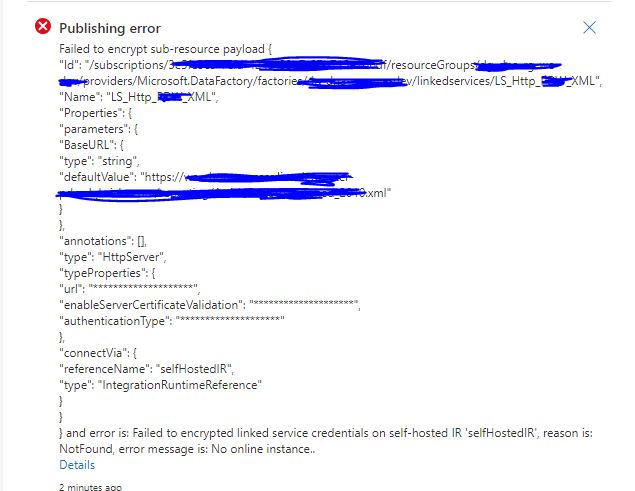
Issue: While trying to publish an HTTP or REST linked service connection from master to live, we get an error if it is going through a self hosted Integration run time to an on-premise network. 

Publishing error
Failed to encrypt sub-resource payload

and error is: Failed to encrypted linked service credentials on self-hosted IR 'selfHostedIR', reason is: NotFound, error message is: No online instance..


Cause: When you have a HTTP call that happens inside an on-premise network and you use a self hosted integration run time to connect to this, the first time the linked service is published it has to validate the connection and hence requires the Self Hosted IR to be up and running. 

Solution: The solution is to have the self hosted IR( Azure VM in our case ) up and running while trying to publish from master to live. This enables the validation of the linked service connection, this fixed it for us.

Please do let us know if this fix worked for you. 

Monday, January 23, 2023

Azure Synapse Analytics workspace outage in West Europe - 23rd January 2023

There seems to be a region wide outage for Azure Synapse Analytics workspaces in the West Europe Region. We have not been able to open up our synapse workspaces hosted in West Europe region from the morning.

Twitter users were the first to report this to Azure support early in the morning today in CET time.


It is really weird as Microsoft Health Service doesn't show any service as down in west europe region,


A couple of hours later they have put up a notification as an emerging issue on the same. 

Impact Statement: Starting at 05:30 UTC on 23 Jan 2022, a number of Azure Synapse Analytics customers with resources in West Europe may be experiencing connectivity issues when trying to access their workspaces. Current Status: We are aware of this issue and are currently investigating to understand the underlying cause and work on a mitigation strategy. Further updates will be provided in 60 minutes, or as events warrant.

Microsoft is yet to provide an ETA on the same. There have also been multiple community posts raised asking for help on the same. 

Users are calling out Azure for not reporting the same on health portal.

We will keep following up and sharing udpates here. You could also follow the below community portal question to get updates on the same. c

https://learn.microsoft.com/en-us/answers/questions/1163259/synapse-workspace-in-west-europe-not-opening-up

update 11:05 AM UTC 


Update 12:50 PMUTC

 Update 18:17 PM UTC ( Hotfix applied and rolled out)

Our instances are up at the moment.


Friday, October 21, 2022

Authorization Failed error while creating Azure Data Factory Instance

Issue description: New user not able to create an Azure Data Factory instance despite having owner or contributor group access at resource group level.

Error - The client '' with object id '' does not have authorization to perform action '' over scope '/subscriptions/' or the scope is invalid. If access was recently granted, please refresh your credentials. (Code: AuthorizationFailed) (Code: AuthorizationFailed)  

Root Cause - The root cause of this issue is that, when you setup a subscription, only a default set of Microsoft Providers are by default registered. 


Fix: Go to Subscriptions > Resource Providers and add/register the 'Microsoft.DataFactory' provider. 


Wednesday, September 15, 2021

Databricks Cluster termination due to Cloud Provider Launch Failure - Allocation Failed

Databricks Cluster Termination due to lack in Allocation of Resources


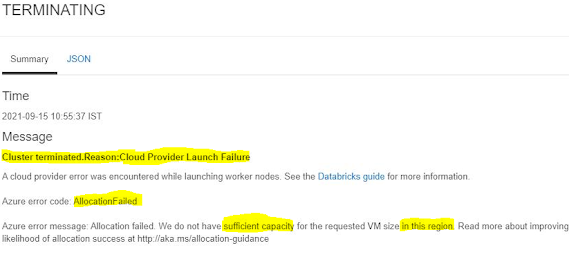
Issue: Restarting a terminated cluster gives the below error message

Cluster terminated.Reason:Cloud Provider Launch Failure

A cloud provider error was encountered while launching worker nodes. See the Databricks guide for more information.

Azure error code: AllocationFailed

Azure error message: Allocation failed. We do not have sufficient capacity for the requested VM size in this region. Read more about improving likelihood of allocation success at http://aka.ms/allocation-guidance


Cause: Allocation of resources failing as Azure cloud doesn't have requested VM size in the region.  This is a region specific error when the requested resources are too much for the region and doesn't have additional resources to get the cluster running.

Resolution:  Microsoft has documented the resolutions here in this article.

Update:- After waiting a while and a couple of restarts later, it started running again for us.

Tuesday, July 6, 2021

Synapse - CREATE TABLE as SELECT with Distribution - Not recognized error [Solved]

Scenario: While trying to create a backup of a table in one Synapse schema into another backup  table  in another schema,  

example syntax below,


Msg 103022, Level 16, State 1, Line 4
Parse error at line: 2, column: 8: DISTRIBUTION is not a recognized table or a view hint.Msg 103022, Level 16, State 1, Line 4 
Parse error at line: 2, column: 8: DISTRIBUTION is not a recognized table or a view hint.


Solution: To resolve the issue change the syntax from existing 

CREATE TABLE mySchema.bkp_Students AS SELECT * FROM enrollment.Students

WITH ( DISTRIBUTION=HASH(Student_id)

CLUSTERED COLUMNSTORE INDEX )  


to

CREATE TABLE mySchema.bkp_Students 

WITH ( DISTRIBUTION=HASH(Case_id),

CLUSTERED COLUMNSTORE INDEX )  

AS SELECT * FROM enrollment.Students


A table needs to have a default distribution before data can be inserted into it.

Sunday, June 13, 2021

Learning plan to clear DP 900 - Azure Data Fundamentals Certification

Azure Data Fundamentals DP 900 Badge

After having worked on couple of small data engagements in Azure Cloud, I have started my journey towards achieving a Azure Data Engineer Associate Badge. As a first, i started with DP 900, which is a beginner data fundamental course which focuses on core concepts of data and data services available in Azure. The certification excepts you to have a basic understanding of all key services and concepts in Data warehousing and Visualization.

Like any other online certification exam, 30 minutes before the actual schedule the test link starts to become active. A proctor(invigilator) will join you on chat and verify your government ID details and the surroundings of your test room, which you have to take a screenshot of. Once they are convinced that you are a fair candidate, They initiate the exam. 

Coming to the exam,  I had a total of 49 questions, and was fairly easy considering I have some experience on the topic and that i had only prepared just a a day ahead. I was able to score 922 in the exam easily with a day of preparation.

Below are the materials that I used to prepare, 

  • FreeCodeCamp.Org crash course in Youtube - Partnered with ExamPro.com
I went through this fairly basic video course in FreeCodeCamp. It is not accurate or exhaustive enough if you want to go to details, but for every Azure service or data concept, they do cover the basic functionalities, and at the end of each lessson, they have a cheat sheet which I found really helpful for a last minute read. 

Some parts are a little vaguely explained, so suggest going for the Udemy course below if you need a deeper understanding.


       This is an absolutely wonderful course. If you really have the time, do go through this course. More than the course, there are two practice set of questions at the end of this course. First one with around 93 questions and second with 100 questions. The questions I got on the exam were mostly connected to the questions on this course. Maybe a little re-worded or arranged from the course, but the basic content remains the same. I did both these question sets around 2 to 3 times just a few hours before on exam day and made sure I consistently got 90%+ scores. 

To summarize, if you are running short on time. Start with the 3 hour FreeCodeCamp course. Thoroughly take notes and understand. Once you are done with the course, repeat, repeat, and again repeat these practice questions from the udemy course until you consistently get a 90%+ score.

Happy Learning. Let us know if you were able to complete the Certification following this approach.

Saturday, November 21, 2020

Get Error log for child pipelines in an execute pipeline activity in ADF

Scenario: We have a pipeline in Azure Data Factory, where we have a few lookup activities and then sequentially execute another  child pipeline using the execute pipeline activity. see the flow below,

The screenshot below is the parent pipeline, where you have two lookups and a sequential execute pipeline step which calls another child pipeline.


See below the child pipeline where you have lookup and a ForEach1 loop,


The problem here is ,when we execute the parent pipeline and something fails in say the ForEach loop in the child pipeline, ADF doesn't call out the actual error from child pipeline in the parent pipeline and only gives out the following error messages, which is very generic.


Now if you see the error above it is very generic and says something failed in the For Each loop in the child pipeline. 

Solution: The solution is simple, just to go the execute pipeline error step, click on output as shown below.


When you click on output, the below popup box appears, click on  pipelineRunid which takes you to the child pipelin.e


Once inside the child pipeline, click anywhere in the workspace and go to output tab, you should be able to see the failure logs as below.


Hope this helped you. 


Monday, June 29, 2020

Key Concepts and Focus Areas to Clear Azure AZ900 examination

In our last blog post on Microsoft Azure AZ-900 fundamentals certification, We had given a set of tips to quickly and easily clear the exam, only if you are running short on time. We thought again and it would be better if we could again prioritize and again give a subset of topics to be learned, where most questions usually come from. 

Personal recommendation is to go through this 3 hour AZ900 video course from FreeCodeCamp and ExamPro and then do practice tests. Separate blog post available on the same.

If you have already started looking into the course syllabus, you would know that the exam is divided into four sub divisions,
  1. Understanding of Cloud Concepts.
  2. Understanding of Core Azure Services.
  3. Understanding of Security, Privacy, Compliance and Trust.
  4. Understanding of Azure Service Level Agreements, Pricing and Life Cycle.
For the first section of Cloud Concepts, below are the key concepts you should learn,

  1. Differentiate Iaas, Paas and SaaS. Learn examples for each in Azure. 
  2. Classify common resources( Virtual Machine, Azure SQL server, Web Apps) to IaaS, PaaS, SaaS etc.
  3. Difference between Capital Expenditure and Operational Expenditure.
  4. Differentiate and understating of Dynamic Scalability, Fault Tolerance, Disaster Recovery, Elasticity and Low Latency.
  5. Differentiate between Private, Public and Hybrid Cloud ?
  6. Understanding of Regions, Availability Sets and High Availability in Azure.
  7. Basic understanding of High Availability Regions and how it works ? 
  8. Understanding of Resources and Resource Group. 

When move on to the next section of the exam, which is on Azure Core Services, below are the most crucial topics.
  1. Basic understanding of the following Azure Core Services. Easy Summary read here.
      1. Azure Machine Learning Studio. - Predictive Analytics package.
      2. Azure IOT Hub. - IOT device communication services.
      3. Azure Congnitive Services - Speech to text, image processing, NLP services.
      4. Azure HDInsights  - Opensource Apache Hadoop platform.
      5. Azure SQL Server - Relational Database Service.
      6. Azure Cosmos DB - NoSQL Database service in Azure.
      7. Azure Synapse Analytics - Datawarehouse optimized database solution.
      8. Azure Databricks - Apache Spark based analytics service.
      9. Azure Functions - Serverless compute services to host web apps.
      10. Azure App Service - Service to host web apps.
      11. Azure Application insights - Insight app, showing anomalies in web apps.
  2. Difference between Compute Services and Server-less Compute Services ? and examples.
  3. Understanding of Different Interfaces to create resources in Azure ? CLI, Azure Portal, PowerShell.
  4. Using Azure Interfaces to create resources from Windows, Linux, MAC and Android, compatibility of each interface to OS ?
    • Windows - CLI, PowerShell, Portal
    • Linux - CLI, Portal.
    • MAC - Poweshell, Portal.
    • Iphone - Portal and CLI.
  5. Understanding of Azure Resource Manager ?
  6. Understanding of Scale Sets in Azure and limitations of same ?
  7. Implementing high availability in Azure ? Minimum configuration required ?
    • 2 VMs and 2 availability zones
  8. Concept of Virtual Networks, Subnets, Network Security Groups in Azure.
  9. Understanding Azure Load Balancer, Azure VPN/Local Gateways and Azure Firewall ?
  10. What is Azure Monitor and it's responsibilities?
  11. What is Azure Advisor and it's responsibilities?
  12. Differentiating Azure Monitor and Azure Advisor responsibilities. 
  13. Types of Storage Services in Azure ? Different scenarios of usage.
Below are the main topics under security, privacy, compliance and trust that one needs to read on,

  1. What is Azure Active Directory ? 
  2. Azure Active Directory integration with On-premise Active Directory ?
  3. Multi-factor Authentication in Azure?
  4. Azure Security Center ?
  5. Azure Information Protection Service in Azure ? ( Protects emails and documents)
  6. Setting Locks for Resources in Azure ? Multiple locks on same resources ?
  7. Understanding of policies like GDPR, Government, NIST, ISO standards etc.
  8. Understanding of setting custom policies in Azure ?
  9. Azure Key Vault and it's significance ?
  10. Azure DDoS protection services, difference between Basic and Standard schemes ?
  11. Azure Role Based Access Control?
  12. Azure Compliance Manager ?

The final section is on Pricing, SLA and Lifecycle of Products, the key concepts to look here are below,

  1. Azure Subscriptions and Azure Management Groups ? Hierarchy of Subscriptions/Management Groups, Can Subscriptions be clubbed ? Can resources be moved from one subscription to another ?
  2. Subscription management understanding ?
  3. Difference between Public Preview, Private Preview and General Availability ?
  4. TCO calculator understanding.
  5. Understanding of SLA in Azure ? Percentage of uptime? 
  6. Combined Composite SLA's when combining two Azure Products ?
  7. How to improve SLA's by going for two region deployment, high availability etc.
  8. Understanding of how Azure pays you back when SLA is not met ?
  9. Azure Support plans available, differentiate Basic, Developer, Standard, Professional Direct and Enterprise Support.

Note: The questions and topics discussed above are the key focus areas of AZ900 exams, however you should run through the other sections of the exams to gain confidence. 

Saturday, June 27, 2020

How I cleared AZ900 - Approach, Materials and Mock/Practice exam - June 2020


So finally I cleared my AZ 900 examination today and got my first Azure Badge. It was an online exam scheduled at 7 15 PM IST. I joined online at around 6 30 PM and cleared my test prerequisites checks, around 6 45 the 'Begin Exam' link started appearing.  

A proctor(invigilator) will join you on chat and verify your governemnent ID details and the surroundings of your test room. Once they are convinced that you are a fair candidate, They initiate the exam. 

Coming to the exam,  I had a total of 32 questions, and was fairly easy considering I prepared just a couple of days ahead. Below are the materials that I used to prepare, 


  • FreeCodeCamp.Org crash course in Youtube - Partnered with ExamPro.com
This is the only video tutorial I went through to crack the exam. It is just 3 hours long, really easy and straight forward. Doesn't overburden you with a lot of things and is straight to point. 


        This is a very exhaustive course. If you really have the time, do consider giving this course a try. More than the course, there are two practice set of questions at the end of this course. First one with around 115 questions and second with 100 questions. The questions I got on the exam were mostly connected to the questions on this course. Maybe a little re-worded from the course, but the content sticks to the same. I did both these question sets around 2 to 3 times on exam day and made sure I consistently got 90%+ scores. 

       I also went through this dump, this one is really close to the exam as well. You can expect most questions in this exam to be more or less connected to the questions discussed here. 

Out of the 32 questions, guess around 4-5 were not from the dump, but were more or less connected to questions from these dumps.

Update - 06/29/2020 - Suggested read on Key Focus Areas and Concepts to Clear AZ900 exam

To summarize, if you are running short on time. Start with the 3 hour FreeCodeCamp course. Thoroughly take notes and understand. Once you are done with the course, repeat, repeat, and again repeat these practice questions until you consistently get a 90%+ score.


Monday, June 22, 2020

Resources in Microsoft Azure - Hierarchy, Prerequisite and Examples

Resources are the most fundamental entity in a Microsoft Azure cloud solution. Anything from Virtual Machines to Azure SQL databases to Storage accounts can be classified as an Azure resource. 

To create a resource in Azure, as a prerequisite, you would require four levels of hierarchy, 'Resource' being the last in the tree and Management group being the first. The below diagram explains a sample, where we examine the resources created for a sample ETL project. Where you have two database servers, one for source and target, a resource each for both. Since they are both resources that point to databases, logically I grouped them under one Resource Group. 

Here in the example below, we created one resource group for the server hosting the ETL tool. The images of this server for multiple environments( Development, Test, Production), all can be logically grouped under one single Resource Group again. Same way for any visualization tool. 

Azure AZ900 Hierarchy


The first and fore-most prerequisite to create a resource is to have a Resource group. Again a resource group is only created under a Subscription group and a subscription group under a Management group.

Below are the four levels,
  1. Management Group - Logical containers holding multiple subscriptions
  2. Subscription - Logical containers holding Resource Groups and billing in Azure.
  3. Resource Group - Logical containers grouping multiple individual resource, separately or individually.
  4. Resources - Lowest level of entity/object in Azure.                       

More reads on Azure Resource and it's hierarchy are available in below link.

Monday, June 8, 2020

Creating your First Azure Cloud Free Account - Step by Step

  
Recently I tried out creating my first Azure free account to play around the portal and prepare for the 'AZ-900' fundamentals certification. Below are the steps to create your own, it's really easy, however you require a few prerequisites upfront.

Prerequisites to create an Azure free account,
  1. A valid working Phone number.
  2. A valid Credit/Debit Card.
  3. A Microsoft Account username. 

First you need a Microsoft Account, I already had one as I use a secondary outlook account. If you don't have one it is really easy to create, you can create one here at https://account.microsoft.com/account?lang=en-hk .

Secondly you need to have a valid Credit/Debit Card, This is mandatory, I was charged Rs 2, when I signed up. Other than this nominal fee, Microsoft doesn't charge you unless you allow it to. If you exhaust up your resources, you will be asked if you need an upgrade, if you opt for one, you will be charged based on the plan you opted for. So for people looking to create a new account, this shouldn't be a worry/deterrent. 

Thirdly, you need to have a valid phone number which is associated to your Microsoft account, this is where you receive a One Time Password(OTP) which you have to provide during the sign-up process. 

Once you have the above prerequisites ready, go to  https://azure.microsoft.com/en-us/free/, click on Start Free,


Create Azure Free Account


This will take you to a new form page, where you have to give details across four sub sections, 
About you, Identity verification by Phone, Verification by Card, and Agreement.

About you

In About you section, basic details are requested for, from First Name, Last Name, Email Address, Phone Number and Organization. See screenshot below,


Here PAN ID is optional.

Verification by Phone,

In the second section, you have to verify your mobile number with a one-time-password (OTP) send to your mobile number. 


Identity Verification by Card


This is where you have verify your identity, by providing your Debit/Credit card details.


I was charged a very nominal Rs 2, while creating the account.

Sign Agreeement


That's it, once you are done. You can login to your free account and start exploring. Happy learning everyone. 

Friday, May 1, 2020

AZ 900 - Microsoft Azure Cloud - Basic learning path - Part 1

Updated - 06/26 - I cleared AZ900 and here is my AZ900 quick learning path. 

For my career, right now it's high time I up-skilled and get certified in Cloud. I currently work on an Insurance framework which is hosted on an AWS Cloud platform. Though my current work confines me inside an AWS VM machine at all times, I understand that the world is moving aggressively towards cloud platforms and it is easy to fall behind if you don't keep up with that pace.

Thankfully a bunch of colleagues have started a group team learning session to share knowledge around Cloud with the aim of getting the team certified. 

The plan is to get myself certified on the below, before the end of the year, more than getting certified, get a detailed understanding of how cloud works. 
In Parallel, I have also started at looking multiple materials on the Azure Cloud. Here are a few materials online, which helped me get a basic understanding of Cloud for AZ-900 certification.

           Duration : 1 hour 13 minutes. 
           Author: David Chappel

            I was very fortunate to come across this course in April 2020, when PluralSight really opened up it's courses for Free. The course was published in 2015, despite that the course covers Cloud computing basics, and it explains a wide range of scenarios of how Cloud can be implemented by Enterprises and how it can add significant value over the in house systems.

The author is a very experienced cloud architect/practitioner, who at all points in the course, keeps it simple and straight forward. There is no overuse of technical jargon. Easy to understand scenario examples.

Each time I learn something new, I keep a bookmark to a 'Back to the basics course', and this would definitely be the one for Cloud Computing. 


         Going through official documentation is not always a pleasant and fruitful experience. Some tools/frameworks have such complex documentation that you end up being more puzzled than before you referred it. This case it is really simple and straight forward. I already completed two units and it's really easy. My suggestion is you take up a video course and in parallel go through this Microsoft documentation.

I am also looking at finding and shortlisting one Udemy course, there are a handful of ones with good review and rating.  I am trying to shortlist one and write note in the Part 2 version of this blog series - Learning Cloud.

There is also a plan for me to make this a series, I will try to prepare a cheat-sheet notebook and try sharing it here.