Monday, August 22, 2016

Start Oracle 12c pluggable database : PDBORCL

So with a default installation of Oracle 12c, you get a container database as well as a pluggable database. The default name for the pluggable database is 'PDBORCL'.

For those of who you have installed Oracle Business Intelligence 12c would know that the metadata schemas for 12c cannot be installed on a container database. You will need a pluggable database to store these metadata schemas. With default installation you get a pluggable database by the object name 'PDBORCL'. So if you haven't written a database trigger statement to start your pluggable database on Oracle 12c what happens is that only the container database gets started.  The result is that the web service is not able to connect and gather metadata from these two schema's and startup fails. 

So here is how to check the status of your pluggable database and how to mount/open it. To check the status of the pluggable database, first open sqlplus,

once you have opened sqlplus login as the SYS user and once connected run the following query,

SELECT NAME, OPEN_MODE FROM V$PDBS;
Status of Pluggable databases.
This will give you the list of pluggable databases on your 12c installation. To startup or mount the same, you have to run the following command,

ALTER PLUGGABLE DATABASE ALL OPEN;
or
ALTER PLUGGABLE DATABASE PDBORCL OPEN;
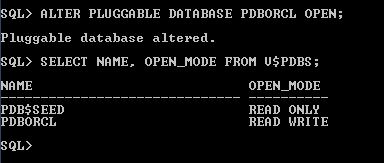
Pluggable Database open command.
Now you can see that the status has changed to read write.

Wednesday, August 3, 2016

DW Concepts: What is a Factless Fact table ? Usage and Examples

So any new BI/ETL developer starting out his career would come across this term, Factless Fact. So what is a factless fact, Let us see with the help of a few examples,

A Factless fact table is defined by Ralph Kimball as,
Fact tables that have no facts but captures the many-to-many relationship between dimension keys.
A simplified definition would be
A table in Data warehouse capturing the relation between two or more entities and doesn't have any measurable quantities or facts.
Imagine the example of a school- class - student - stream enrollment scenario where one row captures information of a student enrolled to a particular class.

ROW_WID
CLASS_WID
STUDENT_WID
STREAM_WID
1
30
25
1
2
31
31
1

As you can see from the above table structure, this table captures or the grain( lowest level of detail ) is enrollment details of a particular student assigned to a class and a particular stream. The WID columns are nothing but surrogate keys of individual dimensions and ROW_WID column is the surrogate key of the fact. 

This table as you can see doesn't contain any measurable entities like Marks. This table acts as an entity to identify the students enrolled in a particular class. and stream We can create derived measures from this fact by taking count of individual ROW_WID items, for eg:
  1. Taking count of students(STUDENT_WID) grouped by Class will give you the number of Students assigned to a class. 
  2. Taking count of students(STUDENT_WID) grouped by Stream gives you the number of students under a single stream. 
  3. Taking the count of classes(CLASS_WID) grouped by Stream gives you the number of Classes under a particular Stream.

The star schema diagram for this factless fact is below,

Student Enrollment Factless Fact Example
Student Enrollment Factless Fact Schema Diagram
Naturally you will doubt that same information can be obtained from other fact tables such as marks, This is true, however imagine a scenario where a student no longer attends school and has not attended exams. In such a case there are chances that his mark details are not present in the marks fact table. Hence you will not be able to get accurately the information of all students assigned to a class or stream. This is where a factless fact table is significant in a Data warehouse.  

Other similar examples of factless fact tables are, 
  • Insurance - Coverage - Membership
  • Sales - Product Promotion Details 


Monday, July 25, 2016

Starting OBIEE 12c from Command Prompt

You can directly start the OBIEE 12c services by going to the Middleware home folder and to the path below, 

Oracle_FMW/user_projects/domains/bifoundation_domain/bitools/bin

Now open a command prompt window, Shift + Righ Click and then type the filename start.cmd. This will start the execution of OBIEE 12c services. 

Alternatively you can run each component individually as it was done previously for OBIEE 11g.

OBIEE 12c Client Administration tool OCI DB connectivity issue

Issue: We were trying to make a connection to Oracle database to import metadata to the OBIEE repository.

Cause: The tnsnames.ora file not present in MW_HOME/network/admin

Resolution:  Even if you have tnsnames.ora in your app folder in your database client folder, you need to have a copy of the same tnsnames.ora file at network/admin folder inside MW_HOME folder created by OBIEE.

So copy the tnsnames.ora file to this location or create a new one and try restarting the Administration tool before trying again. Let us know if you are still facing issues in the comments. 

OBIEE/Weblogic 12c Node Manager Startup Error - DemoIdentity.jks file missing [Solved]

Here is an issue we faced while trying to startup the Node manager in Oracle Business Intelligence 12c when we trying to start the nodemanager service. The issue is caused by a java keystore file missing from a location inside middleware home folder. 

Issue: DemoIdentity.jks keystore file missing from the security folder inside nodemanager folder, i.e at the path

 FMW_HOME/oracle_common/common/nodemanager/security

weblogic.nodemanager.common.ConfigException: Identity key store file not found: Middleware/Oracle_Home/oracle_common/common/nodemanager/security/DemoIdentity.jks Cause: The DemoIdentity.jks file missing from the security folder for nodemanager.

Resolution:

The DemoIdentity.jks file would be available at the folder,

FMW_HOME/user_projects/domain/bifoundation/security

Copy the file from this folder to inside the secuirity folder for NodeManager. Once you have copied the file, try restarting the nodemanager. It worked well for us.