Showing posts with label DBA. Show all posts

Monday, September 25, 2017

Oracle Target Data Warehouse Schema gets Locked out Intermittently. [SOLVED]

Issue: The Oracle Target Data warehouse schema, with dimensions and facts that OBIEE  or analytics engine access gets locked out intermittently. 

Cause: Oracle account lockouts can happen due to multiple reasons in a Data warehouse environment, 


  1. Multiple failed login attempts from a client trying to access the database. 
  2. Password expiry date has already passed. 
  3. One or more of clients accessing the system has an old password, which it uses to connect to the system.
Solution: The best solution here would be to check all jdbc/odbc/OCI connections where you have saved the schema username and password. This could be anything from connection settings in the analytics engine, parameter files, database links etc. The chances are high that at one of these connections we have provided an incorrect or old username/password combination.  This blog suggests to check the listener log on the database server hosting the schema. 

If you are using OBIEE, check the RPD connection, JDBC connection you have created to the target schema on the BI Publisher engine etc. 

It is an extremely poor solution to increase FAILED_LOGIN_ATTEMPTS parameter at the profile level as this increases the risk of a brute force attack on your database or schema. 


Wednesday, December 21, 2016

[Oracle 12c] Find Default and TemporaryTablespaces and size of Database Schemas

This is an example on how to find the default and temporary table space details of a particular schema. This comes in handy when debugging tablespace exceeded errors like ORA-01536 and ORA-00059. This types of errors are often common in data warehouses full base load scenarios.

To find the Default Tablespace and Temporary Tablespace of a particular database schema, you need to have an user with DBA/SYS privileges. After you have logged in with this particular user, run the following SQL query,
SELECT USERNAME, DEFAULT_TABLESPACE, TEMPORARY_TABLESPACE FROM DBA_USERS WHERE USERNAME IN('Schema Name Here')


Temporary Tablespace Size

Next to find the size of the temporary tablespace, To find the size of the temporary tablespace we need to query the system table DBA_TEMP_FILES, Find a sample query below
SELECT TABLESPACE_NAME, SUM(BYTES)/1024/1024 TABLESPACE_SIZE_MB
FROM DBA_TEMP_FILES
WHERE TABLESPACE_NAME IN ('Schema Name Here')
GROUP BY TABLESPACE_NAME

Temporary Tablespace Size.

Default Tablespace Size

To find Default Tablespace size you need to query the system table DBA_DATA_FILES. See a sample query syntax below, 
SELECT TABLESPACE_NAME, SUM(BYTES)/1024/1024 TABLESPACE_SIZE_MB
FROM DBA_DATA_FILES
WHERE TABLESPACE_NAME IN ('EXAMPLE')
GROUP BY TABLESPACE_NAME

Default Tablespace Size.

Tuesday, December 20, 2016

Indexing Strategy in DW: What are Indexes, Types and Significance ?

We are starting off a new series on Indexing strategies in an Oracle Data warehouse. Before going into detail let us first see what an Oracle Index is. 

A database index is a database object that is created to optimize the performance of a read/select statement on a particular table. They greatly reduce the I/O operations on a table by reducing the rows processed. 

Oracle defines Indexes as below, 

An index is an optional structure, associated with a table or table cluster, that can sometimes speed data access. By creating an index on one or more columns of a table, you gain the ability in some cases to retrieve a small set of randomly distributed rows from the table. Indexes are one of many means of reducing disk I/O.
'Indexing' is a term coined for the strategy used for indexing in a particular relational DBMS. Let us see the advantages of indexing
  1. Avoid full table scans and there by reducing the cost and time to retrieve from a database table.
  2. They avoid sorting of oracle queries. which in turn reduces the time for retrieval of data. 
There are different kinds of Indexes available in Oracle and they are the following, 
  • B-Tree or Normal Indexes
  • Bitmap indexes
  • Function based indexes
B-Tree Indexes are the most common indexes in oracle database. by default a B-Tree index is generated. Here values are stored as leafs. There are branch blocks and leaf blocks. Branch blocks contain the leaf blocks where actual pointer values are stored. Here one entry in an index points to one row.

Bitmap indexes are usually created for low carnality columns like Gender, flags etc. In Bitmap indexes one index entry points to multiple rows. 

Function based indexes are indexes created on columns with a function. If one was to apply calculations on a particular column then function based indexes are created on that particular column. 


Thursday, October 8, 2015

[Solved] sqlplus / as sysdba not working

Earlier in one of our previous posts we had discussed how to login to Oracle 11g Database as the SYS user without credentials. However this doesn't apply everywhere, chances are that you might have come across this error as shown below,

Login as SYSDBA

Error
Cause: This is because the Windows user you have used to login is not a part of the ORA_DBA group. 

Resolution: The issue can be resolved by adding the user to the ORA_DBA group as described in the steps below,

  1. Go to Administrative Tools > Server Manager 
  2. Inside the Server Manager > Configuration > Local Users and Groups > Groups locate the ORA_DBA group 
  3. Open the ORA_DBA group and add the windows user to the group as seen below,
  4. Check again with the sqlplus / as sysdba command again after you have added the user to the group and the issue will be fixed as below,
    SQLPlus logged successfully as SYSDBA user

[Solved] Forgot SYSDBA credentials for Oracle 11g

This is a really helpful tip incase you forgot the password to the SYSDBA user in your Oracle 11g Database. You can use the following syntax to login to the server as SYSDBA from RUN,
sqlplus / as sysdba

Login to SQLPlus without SYS credentials
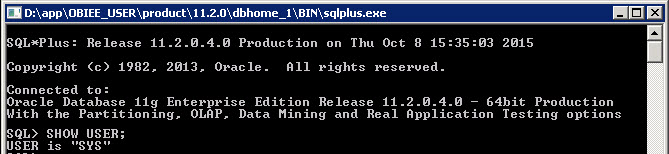
This would open SQLPlus as shown below and you can test the same by running the command SHOW USER

Logged into SQLPlus and test the name of the current user.
Note: This will only work if the Windows User is a part of the ORA_DBA user group. 

Wednesday, September 16, 2015

Oracle 11g Database Installation Log Files and Location

The installation log files of an Oracle 11g Database installation can be found at the following location,

C:\Program Files\Oracle\Inventory\logs

In this folder you will be able to find 3 files as seen below,

Oracle log file directory containing log files.
  1. installActions<Timestamp>.txt - logs the installation steps and details
  2. oraInstall<Timestamp>.err - logs the errors encountered during the installation
  3. oraInstall<Timestamp>.out 

Sunday, August 23, 2015

[Oracle 11g] Run a SQL Script from SQLPlus

Scenario: So there was a set of sql scripts to be executed into my database in order to work on a training session. Instead of copy pasting each script to SQL Developer and then running it. We thought of saving time by executing it from SQL Plus.

Resolution: Place your .sql extension file with the script at a particular folder in your system.

Now go to run and open sqlplus. Connect as a user with SYSDBA or DBA privileges since it is highly likely that this scripts will contain DDL statements like create, alter, or drop.

After connecting to SQLPlus as SYSDBA user, Enter the following in the command line

SQL > @PATH/FILENAME.sql

where PATH specifies the path where the sql file resides and FILENAME the name of the sql file script to be executed. We created a sql script named test.sql with content as shown below.

Sample SQL Script
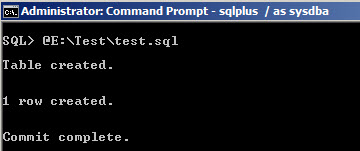
 Save the file and copy the folderpath/filename.sql and go to cmd and paste it as shown below


SQL Script output after execution

[ODI 11g] [Solved] Error 26178 Unable to Connect to Repository User

Scenario: Creation of Master Repository in ODI and have to create a connection to the database to connect to the Master Repostiory schema.

Error Description: ODI-26178: Unable to connect to the Repository user. Listener refused the connection with following error. ORA-12505, TNS:listener does not currently know of SID given in connect descriptor

Connection Error at ODI Repository Creation

Cause: This is either because you don't have an SID with the same name in your database server or you are trying to connect with a service name.

Resolution: Check whether the string after 1521: in our case as you see in the screenshot above is orcl.0.2.15. Now go to app/product/dbhome/network/admin and open the tnsnames.ora check the connection detail and check whether this particular string is the SID or the Service Name. This was the service name in our case and if it's a Service Name then you have to modify your connection string as below,

jdbc:oracle:thin:@HOSTADDRESS:PORTNO/SERVICE_NAME

See that instead of PORTNO:SERVICE_NAME we have used PORTNO/SERVICE_NAME. Now try connecting again you will see that the connection proceeds.


Saturday, August 22, 2015

[Solved] Oracle TNSPING Resolve Name Error (TNS-03505)

Scenario: Issue while connecting to SYS schema in a newly installed database from SQL Developer. So we tried to TNSPING the ORCL connection and we faced a 'failed to resolve name' error as below,


Failed to Resolve Name.
Cause: The issue is because we had both Oracle DB Home and Client installed. The tnsnames.ora file was present only in the network/admin folder in DB_Home and not in Client/network/admin 

Resolution: Copy the tnsnames.ora file and paste a copy to the network/admin folder in client installed directory. Try again as below and connection will be fine.

Error resolved.

[Solved] Oracle SQL Developer JVM not Found Error

Scenario: Setting up Oracle SQL Developer for the first time from inside Database home. The first time you try to run SQLDeveloper.exe you will be prompted for a JDK bin path. 

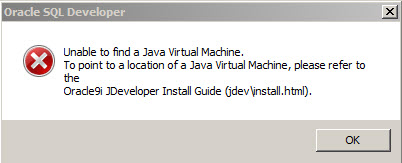
At this step you might face an error as below,

Unable to find Java Virtual Machine error
Cause: The java path defined is a 64bit JDK.

Resolution: Install a new 32bit JDK and then open the sqldeveloper.conf file from app/product/dbhome_1/sqldeveloper/sqldeveloper/bin and delete the JAVA_HOME entry as below,

Changing JavaHome path
After deleting run the SQLDeveloper.exe file and again you will be prompted for a JDK bin path. Now give the path to the new 32bit JDK you just installed. This will make SQLDeveloper run in your machine.

Friday, August 21, 2015

[Oracle11g] Set Oracle Database User Account and Password to Never Expire

Here is a small tip on how to create a new user in Oracle 11g and set the password to never expire. This would come in handy when you are creating new metadata schema's for OBIEE, when for long time these schema's are not in use they tend to get locked and OBIEE services will fail to start.

So in order to avoid this scenario it is better to create a new Oracle user profile and set the parameters to unlimited. Please follow the steps below

After you create a new Oracle user, say for example OBIUSER then the next step is to create  a new User Profile OBIUSER_PROFILE as below
CREATE PROFILE OBIUSER_PROFILE LIMIT
COMPOSITE_LIMIT UNLIMITED
SESSIONS_PER_USER UNLIMITED
PASSWORD_LIFE_TIME UNLIMITED
FAILED_LOGIN_ATTEMPTS UNLIMITED
PASSWORD_REUSE_TIME UNLIMITED
PASSWORD_REUSE_MAX UNLIMITED
PASSWORD_VERIFY_FUNCTION NULL
PASSWORD_LOCK_TIME UNLIMITED
PASSWORD_GRACE_TIME UNLIMITED
CPU_PER_SESSION UNLIMITED
CPU_PER_CALL UNLIMITED
LOGICAL_READS_PER_SESSION UNLIMITED
LOGICAL_READS_PER_CALL UNLIMITED
IDLE_TIME UNLIMITED
CONNECT_TIME UNLIMITED
PRIVATE_SGA UNLIMITED;
If you check the DDL statement above you can see that we have set properties like PASSWORD_LIFE_TIME, PASSWORD_LOCK_TIME, FAILED_LOGIN_ATTEMPTS to unlimited. Hence all the users having this user profile will never get expired. 

The next step is to assign this new User Profile characteristic to the new user OBIUSER,

ALTER USER OBIUSER PROFILE OBIUSER_PROFILE;
Now this user/schema password will never expire. 

References: Oracle Docs

Wednesday, August 19, 2015

[Oracle11g] [Solved] Arabic text update and insert issue in Oracle Database

Issue:  Unable to update or insert Arabic data to a database. Specifically any Arabic data inserted is shown in database as '?????'

Cause:  The issue occurs because the database character set doesn't support  UTF characters.

Resolution: Changing the character set of database to one that supports UTF characters would resolve the issue. 

Check the default character set of the database by running this query,
SELECT value$ FROM sys.props$ WHERE name = 'NLS_CHARACTERSET';


Now if you try inserting or updating any rows with Arabic language data then the data would be displayed as a set of special characters as below,


Log into database as SYS and shutdown the database services giving the below command,

SQL > shutdown immediate;

Now restart the database in restrict mode. When a database is started up in restricted mode then only users with special privileges will be able to access it. We are starting up in restricted mode as we are going to alter a database default value.

SQL > startup restrict

Once the database is up and mounted in restricted mode proceed with changing the default dataset,

SQL > ALTER DATABASE CHARACTER SET INTERNAL_USE AL32UTF8;

Now again issue a shutdown immediate command followed by the startup command,
SQL > startup

Once database has been mounted confirm that the character set has been changed 

SELECT value$ FROM sys.props$ WHERE name = 'NLS_CHARACTERSET';

Now check again in the database to see whether Arabic data can be viewed now.


This is how you change the default characterset of a database. 


Sunday, March 8, 2015

[Oracle11g]Check DB Timezone and Session Timezone

Use the following SQL Queries to check the Database Timezone and Session Timezone values.

Database Timezone

The database timezone function returns the timezone specified when Database was installed or the CREATE DATABASE script was executed .Output would be a value like -08:00  or +5:30 etc


SELECT DBTIMEZONE FROM DUAL;

Session Timezone 

Returns the timezone of the current session, Output would be a value like -08:00  or +5:30 etc

SELECT SESSIONTIMEZONE FROM DUAL;

Monday, January 5, 2015

[OracleDB11g] Unlock a Locked/Expired Schema

You have a locked Schema in a database. Say for example the user SCOTT in Oracle Database 11g.

Try connecting to the SCOTT schema using the default password: TIGER and you will get the following error
ORA-28000: the account is locked
To unlock the account run the following query

ALTER USER SCOTT ACCOUNT UNLOCK;

Now the schema SCOTT would be unlocked and you can connect to the schema.

You can also change the password of the schema if you wish by running the below query

ALTER USER SCOTT IDENTIFIED BY TIGER1 ACCOUNT UNLOCK;

This query will both unlock the SCOTT schema and change it's password to 'TIGER1'. Now you can connect to the SCOTT schema using the new password.

[OracleDB11g] Check if a Schema is LOCKED/OPEN

Here is a small tip on how to check if a Schema in a particular database is Locked or Open.

There are two ways to do this. First step is to try connecting to this schema if you remember the password for the particular schema and if your password is right, you will get the following error,
ORA-28000: the account is locked
The second step is to be followed if you don't remember the password for this schema. Connect to Database as SYSDBA user.

After connecting to the database run the following query to retrieve details of schema's that are currently locked,
SELECT USERNAME,ACCOUNT_STATUS,LOCK_DATE FROM DBA_USERS WHERE ACCOUNT_STATUS NOT IN ('OPEN')
Output:

USERNAME
ACCOUNT_STATUS
LOCK_DATE
SCOTT
EXPIRED & LOCKED
06-AUG-14
OE
EXPIRED

OLAPSYS
EXPIRED & LOCKED
30-MAR-10