Tuesday, December 14, 2021

PowerBI - Synapse Refresh Issue - 'Key didn't match any rows in table'

Issue: PowerBI was not able to refresh the underlying dataset from Azure Synapse in a higher environment in Import mode.

Sample error screenshot is below,

Error Screenshot PowerBI refresh

Cause : The issue was caused when in the higher environment, the schema name was created in upper case letters where as in the lower environment it was in lower case letters. 

Resolution: The fix in this case is to move objects from the existing uppercase schema to lower case, this will incur some effort if you are doing it, since first you will have to move it to a temporary schema name, then drop the uppercase schema name, create lowercase schema name and then move from the temporary schema to lowercase schema name.

Another option is to parameterize the schema in PowerBI and change at one place when you migrate to higher environment.

Sunday, November 28, 2021

Guidewire Datahub Architecture Explained

Guidewire Datahub is a P&C enterprise data warehouse solution built on top of the three key Guidewire Insurance Suite systems namely Guidewire Policycenter, Billingcenter and Claimcenter. It is a ETL framework that has been built using SAP BODS ETL tool and a java framework named DIAL for SCD Type 1 and Type 2 implementation. 

Focused on Property and Insurance clients, Datahub provides an operational datastore which provides a single version of truth and enabling clients to execute cross analytical queries across systems. The system also provides you capability to source data from external data systems. The layers of the architecture enables data quality and auditing to make sure that the data you have in target is clean and audited. 

Guidewire Datahub Basic Architecture

The first layer in the architecture are the sources, which can be either one of the three sources from PC, BC or CC, it can even be an external source or a legacy system. In this layer the data from the sources are loaded into a ftp source and from the ftp source to the relational database where Guidewire Datahub resides. 

The second layer is the Guidewire Datahub layer which is a relational dbms and can be in either Oracle Database or a SQL Server database. In this layer data is captured at an entity level in both Type 1 and Type 2. All the data cleansing, quality checks, balancing an auditing happens at this layer. This layer is loaded and managed using the SAP BODS or SAP Data Services tool.

The next layer is where you built out your star schema diagrams based on your reporting needs, this layer will have your facts and dimensions and will be used by IBM Congnos Analytics to cater to your reporting needs.

This forms the basic architecture of the Guidewire Datahub suite. Please do let me know if you would like me to cover more topics on the Guidewire Datahub suite.

Wednesday, September 15, 2021

Databricks Cluster termination due to Cloud Provider Launch Failure - Allocation Failed

Databricks Cluster Termination due to lack in Allocation of Resources


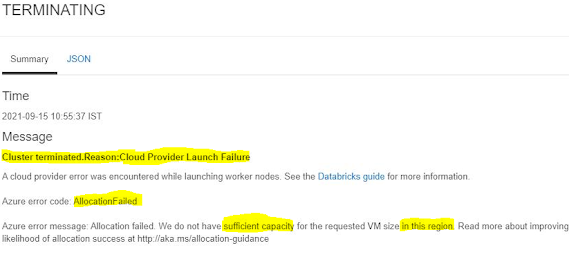
Issue: Restarting a terminated cluster gives the below error message

Cluster terminated.Reason:Cloud Provider Launch Failure

A cloud provider error was encountered while launching worker nodes. See the Databricks guide for more information.

Azure error code: AllocationFailed

Azure error message: Allocation failed. We do not have sufficient capacity for the requested VM size in this region. Read more about improving likelihood of allocation success at http://aka.ms/allocation-guidance


Cause: Allocation of resources failing as Azure cloud doesn't have requested VM size in the region.  This is a region specific error when the requested resources are too much for the region and doesn't have additional resources to get the cluster running.

Resolution:  Microsoft has documented the resolutions here in this article.

Update:- After waiting a while and a couple of restarts later, it started running again for us.

Saturday, August 28, 2021

Understanding Parquet file format - What, Why, How and When - Explained


What is Parquet Format ?

Parquet is a columnar(column-oriented) data format, which was initially built to support the Apache Hadoop ecosystem. It is a read optimized format, which allows efficient reads and efficient compression algorithms.

Why Parquet ?

When you have a dataset that you want to query very efficiently and improve query pruning, Parquet is one file format you could go for. Being a columnar storage option, it greatly improves upon the reads and minimizes Input Output operations on the data.

Below are the summarized advantages of Parquet files,

  1.  Efficient query pruning - With parquet format, columns that are not required while reading the dataset is efficiently pruned. This minimizes the IO operations, there by fast and efficient.

2. Able to process from large volumes of data, and has efficient data compression/encoding mechanisms, there by helping to reduce storage costs as well.

3, Parquet format, though initially built in the Apache Hadoop ecosystem, works well with most data lake storage systems, ADLS, S3, and is supported as external tables in almost all new generation columnar data warehouses.

4. Since parquet is read optimized and a column oriented data format, it is very efficient for data storage in OLAP workloads. Since in OLAP workloads, mostly we only fetch a subset of columns.

How is Parquet stored on disk ?

Below is an example of a parquet file being stored in an Azure Data Lake Gen2 system. The source dataset was small, hence you see just one file.


There are however other way storing where you have a root folder for your parquet and inside the root folder you have multiple part files which split and store the data in the parquet file, something as below,


The lesser part(partition) files you have, the faster your read performance would become. Parquet in spark allows setting the number of partitions(manual partitioning), the ideal scenario here is having a number of partitions somewhere between not very less and not many.

What are the compression schemes in Parquet ?

The most widely used compression scheme for parquet is the Snappy compression mechanism which can compress the original file to a smaller one, hence also contributing to the IO efficiency. Snappy compressed parquet files significantly improve on read performance than parquet files without encoding.

When should I use parquet ?

Parquet should be considered when you have an OLAP use case, and ideally where you have a subset of columns for a problem, the more the number of columns and unique values you have in the column, the lower the performance of parquet. So consider parquet where you have operations that happen on a subset of columns and where you are doing aggregations.

References and Further reads

I found some great beginner articles for the parquet format online, sharing the same below if you are interested to learn more,


Monday, August 16, 2021

Not authorized to view container in Azure Blob under Storage Account

 Error - Below is the error description from inside newly created container under storage account we created

  • This request is not authorized to perform this operation. RequestId:342dca41-601e-004f-0dc9-9291aa000000 Time:2021-08-16T18:10:08.0322108Z 
  • This storage account's 'Firewalls and virtual networks' settings may be blocking access to storage services. Try adding your client IP address ('xx.xx.xx.xxx') to the firewall exceptions, or by allowing access from 'all networks' instead of 'selected networks'


Cause: The client address of your machine is not added as an exception to your firewall settings under the parent storage account


Solution: 

1. The solution is to add your ip address as an exception under 'Networking' > 'Firewall and Virtual Networks' 


2. Click on 'Add your clinet IP Address ( xx.xx.xxx.xxx)


3.  Now click on 'Save' in the top left corner under 'Firewall and Virtual Networks'


4. Now navigate back to the container and you should be able to access the container.