Showing posts with label Azure Data Factory. Show all posts

Friday, January 26, 2024

Copy files from Azure Data Lake to a SharePoint Site

Use Case: We have output files from a use case processed using PySpark in Synapse and loaded into a path in Azure Data Lake as CSV and Excels, but we wanted to put these files into a SharePoint site which was easier for users in the organization to access. 

Immediately as we started researching, we faced a limitation(as of 26-01-2024) in achieving this use case with ADF inside Azure Synapse Analytics, SharePoint site is not yet supported as a sink in ADF/Synapse.

The only other alternative to doing this using a logic app, the steps are fairly simple.

On a high level the steps are as below,

List Blobs from Azure Data Lake - Here you define the storage account, the connection method( we used access key)
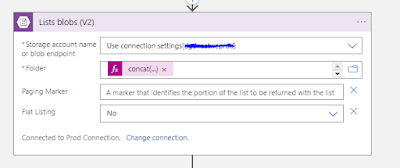

In the next step, we have a for each control loop which iterates the output from the list blobs step, then gets the blob content( pass the path to the file ) and then this blob conent is passed on to a SharePoint 'Create File' step. 

It is important that the path is set up correctly and that the security credentials used have adequate access to the SharePoint. 


Thing to note: The 'Create file' comes with it's set of limitations as all things Microsoft do, where it can move a file of size greater than 1 GB, this is something we will have to live with for now( update as of 26th Jan). 

Thursday, November 23, 2023

Synapse Analytics ADF Error - Failed to encrypt sub-resource payload or linked service credentials [Solved]

Issue: While trying to publish an HTTP or REST linked service connection from master to live, we get an error if it is going through a self hosted Integration run time to an on-premise network. 

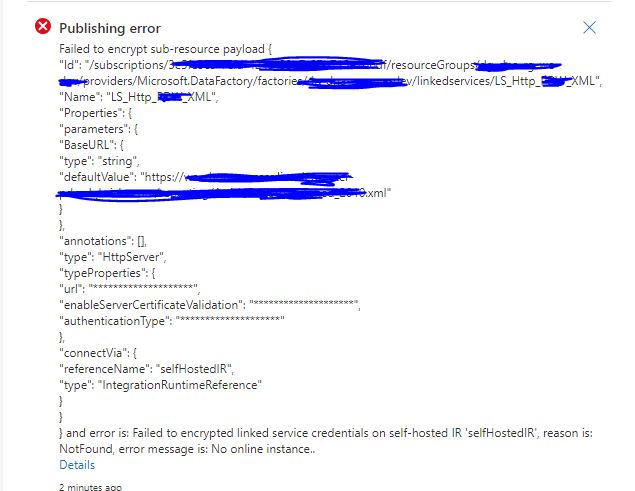
Publishing error
Failed to encrypt sub-resource payload

and error is: Failed to encrypted linked service credentials on self-hosted IR 'selfHostedIR', reason is: NotFound, error message is: No online instance..


Cause: When you have a HTTP call that happens inside an on-premise network and you use a self hosted integration run time to connect to this, the first time the linked service is published it has to validate the connection and hence requires the Self Hosted IR to be up and running. 

Solution: The solution is to have the self hosted IR( Azure VM in our case ) up and running while trying to publish from master to live. This enables the validation of the linked service connection, this fixed it for us.

Please do let us know if this fix worked for you. 

Friday, September 1, 2023

Storage Event Trigger Error - Register Azure Event Grid resource provider

Issue: Trying to create a storage event trigger fails in Synapse/ Azure Data Factory with the below error 

Register Azure Event Grid resource provider to your subscription before creating an event trigger.

Cause: This is caused because Azure Event Grid resource provider is not added or enabled under your Azure Subscription. 

If you are using Azure Synapse Analytics, then you also need to have the Microsoft.DataFactory resource provider regsitered.

Resolution: You can follow the steps to register event grid and data factory resource provider to your subscriptions.


Step 1: go to portal.azure.com and select the subscription where you want to create the storage event trigger.

Step 2: under the subscription go to settings > resource providers.

Step 3: Search and Register the two resource Providers 

Registering Microsoft.DataFactory resource provider

Registering Microsoft.EventGrid resource provider

Try again and now it should be working. Let us know if this worked for you.

Thursday, August 31, 2023

ADF / Synapse - Error converting Excel to Parquet

Error in Synapse / Azure Data Factory

Aim - Build a pipeline that can take an excel as input in a file contianer and write into a parquet file. 

Issue:- When processing the file, the copy activity runs into an error saying one of the fields cannot have more than one value. 

"errorCode": "2200",

    "message": "ErrorCode=ParquetJavaInvocationException,'Type=Microsoft.DataTransfer.Common.Shared.HybridDeliveryException,Message=An error occurred when invoking java, message: java.lang.IllegalStateException:field 42 (COUNTRY_NAME) can not have more than one value: [Ägypten]\ntotal entry:6\r\norg.apache.parquet.example.data.simple.SimpleGroup.add(SimpleGroup.java:106)\r\norg.apache.parquet.example.data.simple.SimpleGroup.add(SimpleGroup.java:196)\r\norg.apache.parquet.example.data.Group.add(Group.java:59)\r\norg.apache.parquet.example.data.Group.append(Group.java:137)\r\ncom.microsoft.datatransfer.bridge.parquet.ParquetBatchWriter.readRow(ParquetBatchWriter.java:112)\r\ncom.microsoft.datatransfer.bridge.parquet.ParquetBatchWriter.addRows(ParquetBatchWriter.java:60)\r\n.,Source=Microsoft.DataTransfer.Richfile.ParquetTransferPlugin,''Type=Microsoft.DataTransfer.Richfile.JniExt.JavaBridgeException,Message=,Source=Microsoft.DataTransfer.Richfile.HiveOrcBridge,'",

    "failureType": "UserError",

    "target": "Copy Bronze - Excel to Parquet",


Cause:- This has to with the excel file having two or more columns with the same name. We had the field "COUNTRY_NAME" twice in the excel and this was causing the issue. 

Fix: Remove the duplicated field and re-process the file again.

Friday, October 21, 2022

Authorization Failed error while creating Azure Data Factory Instance

Issue description: New user not able to create an Azure Data Factory instance despite having owner or contributor group access at resource group level.

Error - The client '' with object id '' does not have authorization to perform action '' over scope '/subscriptions/' or the scope is invalid. If access was recently granted, please refresh your credentials. (Code: AuthorizationFailed) (Code: AuthorizationFailed)  

Root Cause - The root cause of this issue is that, when you setup a subscription, only a default set of Microsoft Providers are by default registered. 


Fix: Go to Subscriptions > Resource Providers and add/register the 'Microsoft.DataFactory' provider. 


Monday, August 16, 2021

Not authorized to view container in Azure Blob under Storage Account

 Error - Below is the error description from inside newly created container under storage account we created

  • This request is not authorized to perform this operation. RequestId:342dca41-601e-004f-0dc9-9291aa000000 Time:2021-08-16T18:10:08.0322108Z 
  • This storage account's 'Firewalls and virtual networks' settings may be blocking access to storage services. Try adding your client IP address ('xx.xx.xx.xxx') to the firewall exceptions, or by allowing access from 'all networks' instead of 'selected networks'


Cause: The client address of your machine is not added as an exception to your firewall settings under the parent storage account


Solution: 

1. The solution is to add your ip address as an exception under 'Networking' > 'Firewall and Virtual Networks' 


2. Click on 'Add your clinet IP Address ( xx.xx.xxx.xxx)


3.  Now click on 'Save' in the top left corner under 'Firewall and Virtual Networks'


4. Now navigate back to the container and you should be able to access the container.


Error 22300 - Azure Data Factory Linked Service cannot connect to Azure SQL Database

 Error:  Error Code 22300 - Cannot connect to SQL Database: 'db-learn-azure.database.windows.net', Database: 'learn-azure-athul', User: 'athul'. Check the linked service configuration is correct, and make sure the SQL Database firewall allows the integration runtime to access. Cannot open server 'db-learn-azure' requested by the login. Client with IP address '20.xx.xx.xxx' is not allowed to access the server.


Error Code 22300


Cause: This happens because the IP address of the Azure Data Factory instance is not known by the Azure SQL Database.

Resolution:  

1. Go to the Azure SQL Database instance in Microsoft Portal > Go to Firewall Settings > 

2.  Change the 'Allow Azure Services and Resources to access this server' to 'Yes' and save the firewall settings


3. Now try connecting again.


Saturday, November 21, 2020

Get Error log for child pipelines in an execute pipeline activity in ADF

Scenario: We have a pipeline in Azure Data Factory, where we have a few lookup activities and then sequentially execute another  child pipeline using the execute pipeline activity. see the flow below,

The screenshot below is the parent pipeline, where you have two lookups and a sequential execute pipeline step which calls another child pipeline.


See below the child pipeline where you have lookup and a ForEach1 loop,


The problem here is ,when we execute the parent pipeline and something fails in say the ForEach loop in the child pipeline, ADF doesn't call out the actual error from child pipeline in the parent pipeline and only gives out the following error messages, which is very generic.


Now if you see the error above it is very generic and says something failed in the For Each loop in the child pipeline. 

Solution: The solution is simple, just to go the execute pipeline error step, click on output as shown below.


When you click on output, the below popup box appears, click on  pipelineRunid which takes you to the child pipelin.e


Once inside the child pipeline, click anywhere in the workspace and go to output tab, you should be able to see the failure logs as below.


Hope this helped you.